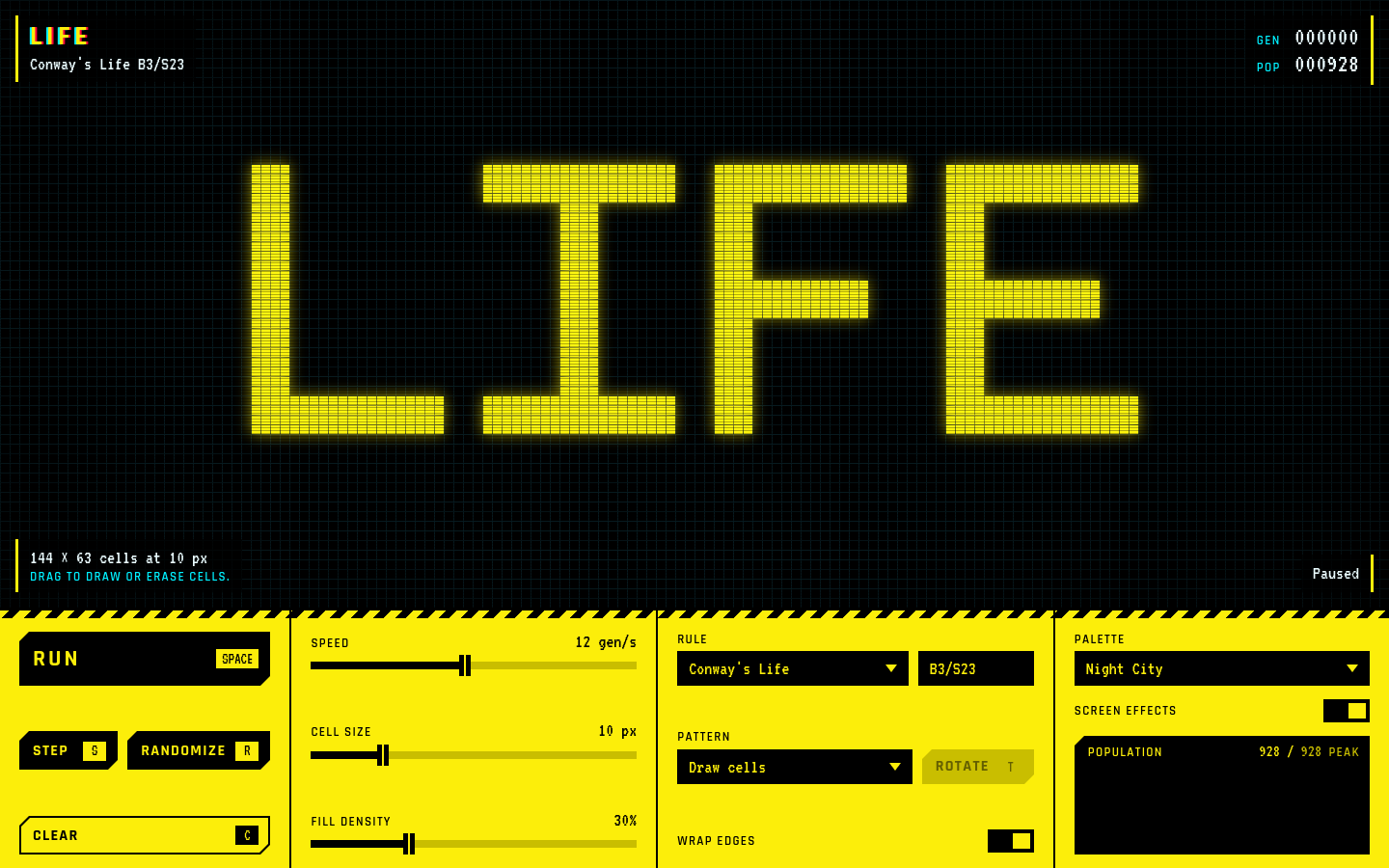
I wanted a client-side Conway’s Game of Life with a fixed layout: the top 70% of the screen runs the simulation and the bottom 30% holds the controls. For the look I asked for Cyberpunk 2077 crossed with Johnny Mnemonic.
I built it in Oh My Pi the way I described in my setup post: plan first, approve the plan, then let the agent execute it. The result is six source files with no dependencies and no build step, so double-clicking index.html runs it. It also lives on this site at /life/.
This post covers the layout, how the engine and renderer work, and a bug the checks missed.
What it does
Rrandomizes the grid at the fill density you set, from 1 to 100%. The default is 30%.- Clicking toggles a cell. Dragging paints or erases, depending on what the first cell under the pointer was.
patternstamps one of ten patterns at the cursor with a cyan preview, andTrotates it. The library has a glider, a lightweight spaceship, copperhead, pulsar, pentadecathlon, the Gosper glider gun, the Simkin gun, the R-pentomino, acorn and diehard.cell sizeruns from 2 to 40 px, and the grid re-tiles to fill the screen whatever you pick.rulehas eight presets, including HighLife and Day & Night, and a field for any custom rule in B/S notation. Conway’s isB3/S23.speedhas 18 stops from 1 to 120 generations per second, and the screen shows the measured rate.paletteswitches between Night City, Mnemonic and Lo-Tek, andscreen effectsturns the bloom, scanlines, vignette and afterglow on or off.
Two halves, two looks
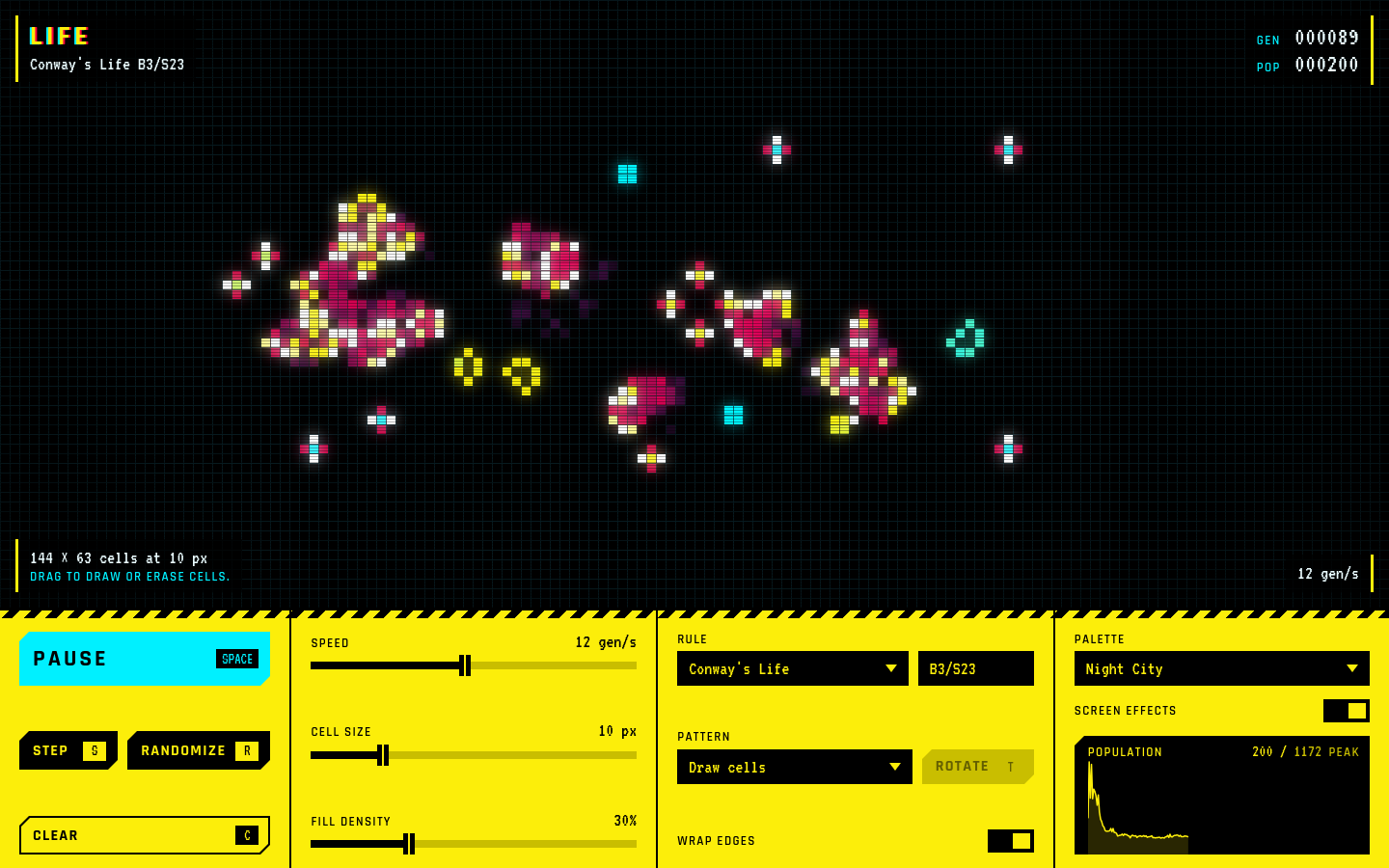
The top is a black CRT. A newborn cell flashes white, then runs yellow (#fcee0a) and fades to cyan (#00f0ff) by its 36th generation. Active regions shimmer yellow and white, and stable structures cool to cyan. A dead cell leaves a magenta ember that fades in about half a second. The bottom is a flat yellow slab with black cut-corner plates and a hazard stripe along its top edge. The only other colors down there are the Run button, which turns cyan while the simulation runs, and red on an invalid rule.
During planning the agent rendered a prototype in headless WebKit at five viewport sizes and tuned it from the screenshots. It dimmed the embers twice because bright red swamped the yellow, and it turned the bloom down because a stronger blur smeared dense grids into blobs.
The title is spelled in live cells. LIFE is 928 of them at 1440 × 900. If you touch nothing, the simulation starts 1.6 seconds after load and the letters dissolve into it. Any click or keypress cancels that, and with prefers-reduced-motion: reduce it never starts on its own.
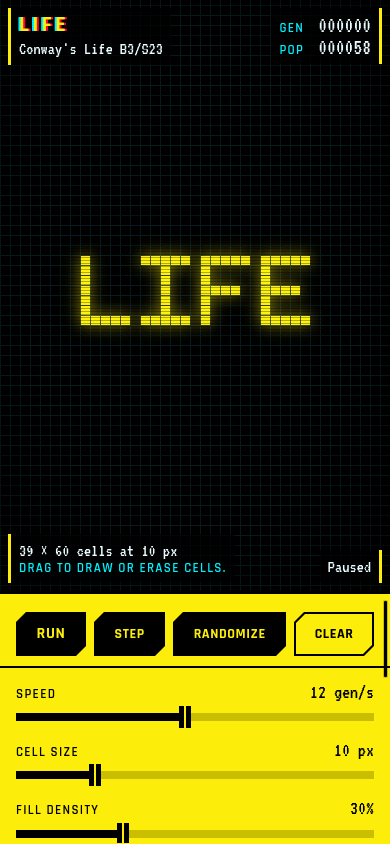
On a phone-sized screen, 390 × 844, the deck collapses to one column and the transport buttons stay pinned to the top.
No build step
The six source files and what each does:
| File | What it does |
|---|---|
index.html | The screen (canvases and corner readouts) and the deck (four control modules) |
css/styles.css | Design tokens, the 70/30 grid, CRT effects, the yellow deck, responsive rules |
js/engine.js | Rule parsing, the generation step, editing and resizing. No DOM |
js/data.js | Speed stops, rule presets, palettes, patterns and the title glyphs. No DOM |
js/screen.js | Canvas sizing, phosphor rendering, the cursor ghost and the population chart |
js/main.js | State, the run loop, control wiring, pointer and keyboard input, boot |
The four scripts are classic defer scripts that share one global, Life. The fonts are vendored: Rajdhani for labels and buttons and VT323 for readouts. They are three woff2 files totaling 49 KB, with their SIL Open Font License texts next to them. The favicon is a data URI, and the page makes no requests to other origins.
On this site the folder lives in static/life/. Hugo copies the static directory to the output as is, so /life/ serves the files exactly as they are in the repo.
The engine
The grid is stored with a one-cell ghost border. Before each step, wrap mode copies the opposite edges into the border and no-wrap mode zeroes it, so the inner loop counts eight neighbors with no bounds checks. The rule is a lookup table of 18 entries indexed by state * 9 + neighbors:
const n = cur[i - W - 1] + cur[i - W] + cur[i - W + 1] + cur[i - 1] + cur[i + 1] + cur[i + W - 1] + cur[i + W] + cur[i + W + 1];
const was = cur[i];
const alive = table[was * 9 + n];
Switching from Conway’s B3/S23 to HighLife’s B36/S23 only rewrites the table. parseRule accepts B3/S23 or S23/B3 in either case, and it rejects any rule that includes B0. With B0 every empty cell is born each generation, and the whole screen strobes.
To check the engine against something other than my own code, I ran a Gosper gun. Wikipedia says it emits a glider every 30th generation. On a 200 × 120 grid with wrap off, the population in my check went 36, 41, 46, 51 at generations 0, 30, 60 and 90. A glider is five cells.
BTW, the engine check is a throwaway bun script, not a test suite in the repo.
The run loop executes at most four generations per frame and drops any backlog. A grid too big for the chosen speed slows down instead of freezing, and the screen shows the real rate. At 2 px cells the grid is 720 × 315, or 226,800 cells. At the top speed of 120 generations per second the on-screen rate read between 118 and 122 in headless WebKit on my Mac.
The renderer
Each cell has one heat byte. Zero is off, 1 to 31 is an ember, and 32 to 255 is alive, counting up with age. A 256-entry Uint32Array maps heat to a packed color. The draw loop writes those colors straight into an ImageData through a Uint32Array view of its bytes, then hands it to putImageData:
// ImageData bytes are RGBA; a little-endian Uint32 view reads them as ABGR.
function pack(c) { return (0xff000000 | (c[2] << 16) | (c[1] << 8) | c[0]) >>> 0; }
That packing assumes a little-endian machine. The canvas is cols × rows pixels, one pixel per cell, and CSS scales it up with image-rendering: pixelated, so cells stay crisp squares. Bloom is a second canvas drawn from the first, blurred in CSS and blended with screen at 60% opacity. The loop draws only when something changed or an ember is still fading, so a paused, settled grid does no canvas work.
Re-tiling on resize
The cell-size slider sets cols = ceil(width / size) and rows = ceil(height / size), centers the grid and clips the edge cells. The squares fill the screen with no letterboxing at any size. At 1440 × 900 that is 144 × 63 cells at 10 px, 720 × 315 at 2 px and 36 × 16 at 40 px. When the size changes, Engine.resized copies the existing cells into the new grid around the center.
The bug the checks missed
After the agent wrote the files, it ran the plan’s 15 checks in headless WebKit and Chromium. They covered shortcuts, drawing, patterns, rule parsing, wrap, cell size, load, palettes, five viewport sizes, screenshots, reduced motion and file://. The cell-size check placed a pulsar, which has 48 live cells, at 10 px. Then it pressed ArrowRight ten times, ArrowLeft fifteen, Home and End. The population should stay 48 at every size. It did until End, where the 36 × 16 grid at 40 px read 24.
The agent’s report called that harmless, a side effect of centering by rounding down. An advisor reading the session disagreed, and its note landed right after that report:
<advisory advisor="General" severity="concern" turns_ago="10" guidance="weigh, don't blindly obey">
End giving POP 24 is a real bug in `Engine.resized`, not noise; engine.js:124 matches the appendix. `Math.floor((new - old) / 2)` rounds odd differences toward up-left whether the grid grows or shrinks, so every slider tick drifts the cells up-left. I traced the rows for your exact sequence. The pulsar starts at y=25 of 63. The 10 ticks right leave it at y=7 of 32, 2.5 rows off center. The 15 ticks left leave it at y=49 of 126, 7.5 off. Home puts it at y=143 of 315. End puts it at y=-7 of 16: pulsar rows 0 to 5 (24 cells) are clipped and lost for good.
</advisory>
I reproduced it before touching the code. Replaying the same slider sizes through Engine.resized put the pulsar’s top row at row 7, 49 and 143 at the first three stops, matching the trace. At 40 px it left 24 cells. The offset used Math.floor. Every odd change in size shifted the pattern half a cell up and left, grow or shrink, and the error accumulated over a drag. By 40 px the top six rows of the pulsar sat above the grid and were deleted.
The engine check in the plan missed it because it resized a 30 × 30 grid to 60 × 40 and back. Every size difference there is even, so the rounding never mattered. The fix anchors each grid on its center cell:
-      const dx = Math.floor((cols - this.cols) / 2), dy = Math.floor((rows - this.rows) / 2);
+      const dx = (cols >> 1) - (this.cols >> 1), dy = (rows >> 1) - (this.rows >> 1);
The shift is now the difference between two centers, so it depends only on the two sizes. Going from one size to another and back returns every surviving cell to where it started. Before the fix, resizing a 63 × 63 grid to 58 × 58 and back returned different cells. After it, the same cells came back. I replayed the slider sequence in the browser and the pulsar read 48 at every size, including 40 px.
Live and peak population
The Population module shows the live count next to the peak, above a chart of the last 240 generations. At the title screen it reads 928 / 928 PEAK. In the running screenshot above, taken around generation 90, the live count is well under the peak. The first version took the peak from the chart’s samples, which only record generations. The title screen said Peak 0 beside 928 live cells, and cells drawn by hand never counted. The peak now lives on the engine and updates on every edit and every step, and Clear and Randomize reset it:
this.population += alive ? 1 : -1;
if (this.population > this.peak) this.peak = this.population;
How it adds up
I wanted a client-side Game of Life with a 70/30 split and a cyberpunk look. It came out as six source files and three fonts that run from a double-click, and it lives on this site at /life/.


