When AI agents fail mid-execution, they often lose their entire context and any work completed up to that point. API rate limits, network timeouts, and infrastructure failures can turn a sophisticated multi-step agent into an expensive waste of tokens. What if your agent could survive these failures and resume exactly where it left off?
This post walks through how I built a multi-model AI intelligence system using Temporal’s AI SDK integration for TypeScript. We’ll examine the architecture, explore how tools become Temporal Activities, and show how the scatter/gather pattern enables parallel queries across Claude’s model family.
What is NetWatch?
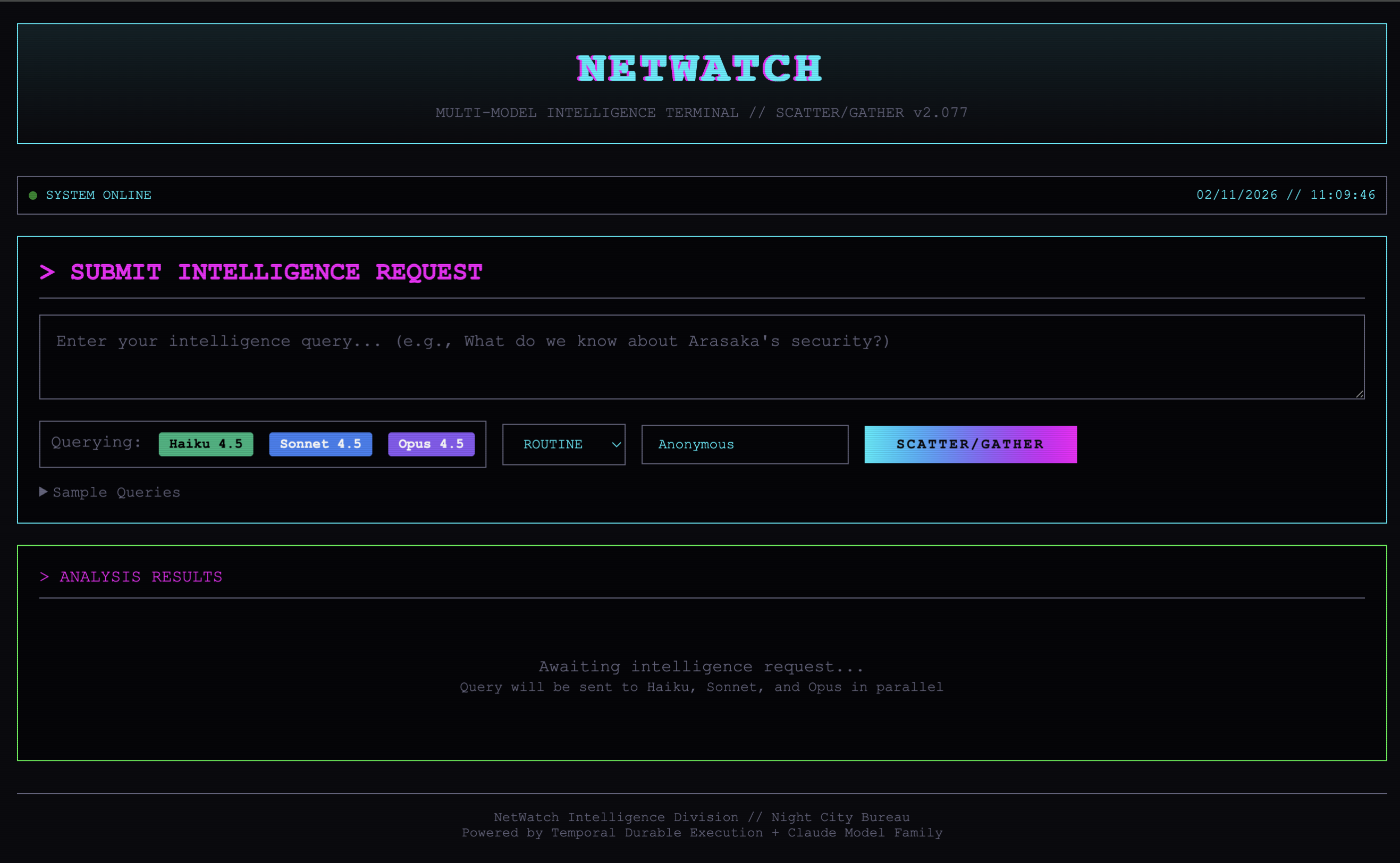
NetWatch is a cyberpunk-themed intelligence analysis system set in Night City, 2077. It demonstrates several enterprise integration patterns running on Temporal:
- Multi-Model Scatter/Gather: Query Haiku 4.5, Sonnet 4.5, and Opus 4.5 in parallel, then aggregate results
- Tool-Equipped AI Agents: Agents with access to corporate databases, runner profiles, and threat analysis tools
- Durable Execution: Every LLM call and tool invocation is automatically persisted and retryable
Temporal’s AI SDK Integration
Temporal’s integration with the Vercel AI SDK lets you write AI agent code that looks almost identical to standard AI SDK usage, but with one critical difference: every LLM call becomes durable.
LLM API calls are fundamentally non-deterministic. In a Temporal Workflow, non-deterministic operations must run as Activities. The AI SDK plugin handles this automatically. When you call generateText(), the plugin wraps those calls in Activities behind the scenes.
This means your agent survives:
- Infrastructure failures (process crashes, container restarts)
- API rate limits (automatic retries with backoff)
- Long-running operations (agents can run for hours or days)
- Network timeouts (graceful retry handling)
The workflow code maintains the familiar Vercel AI SDK developer experience:
import { generateText, tool } from 'ai';
import { temporalProvider } from '@temporalio/ai-sdk';

export async function netwatchIntelAgent(request: IntelRequest): Promise<IntelResponse> {
  const result = await generateText({
    model: temporalProvider.languageModel('claude-sonnet-4-5-20250929'),
    prompt: request.query,
    system: NETWATCH_SYSTEM_PROMPT,
    tools: createTools(),
    stopWhen: stepCountIs(10),
  });
  return result.text;
}
The only change from non-Temporal code is using temporalProvider.languageModel() instead of importing the model directly. This single change gives you durable execution, automatic retries, timeouts, and full observability.
Architecture Overview
The NetWatch system consists of four components. The Express API server connects to Temporal via gRPC, starts workflow executions, and waits for results. Temporal doesn’t push work to workers; instead, workers poll a Task Queue. This pull-based model means workers scale independently, and Temporal handles load distribution. When a worker picks up a task, any LLM calls through temporalProvider.languageModel() are automatically wrapped as Activities.
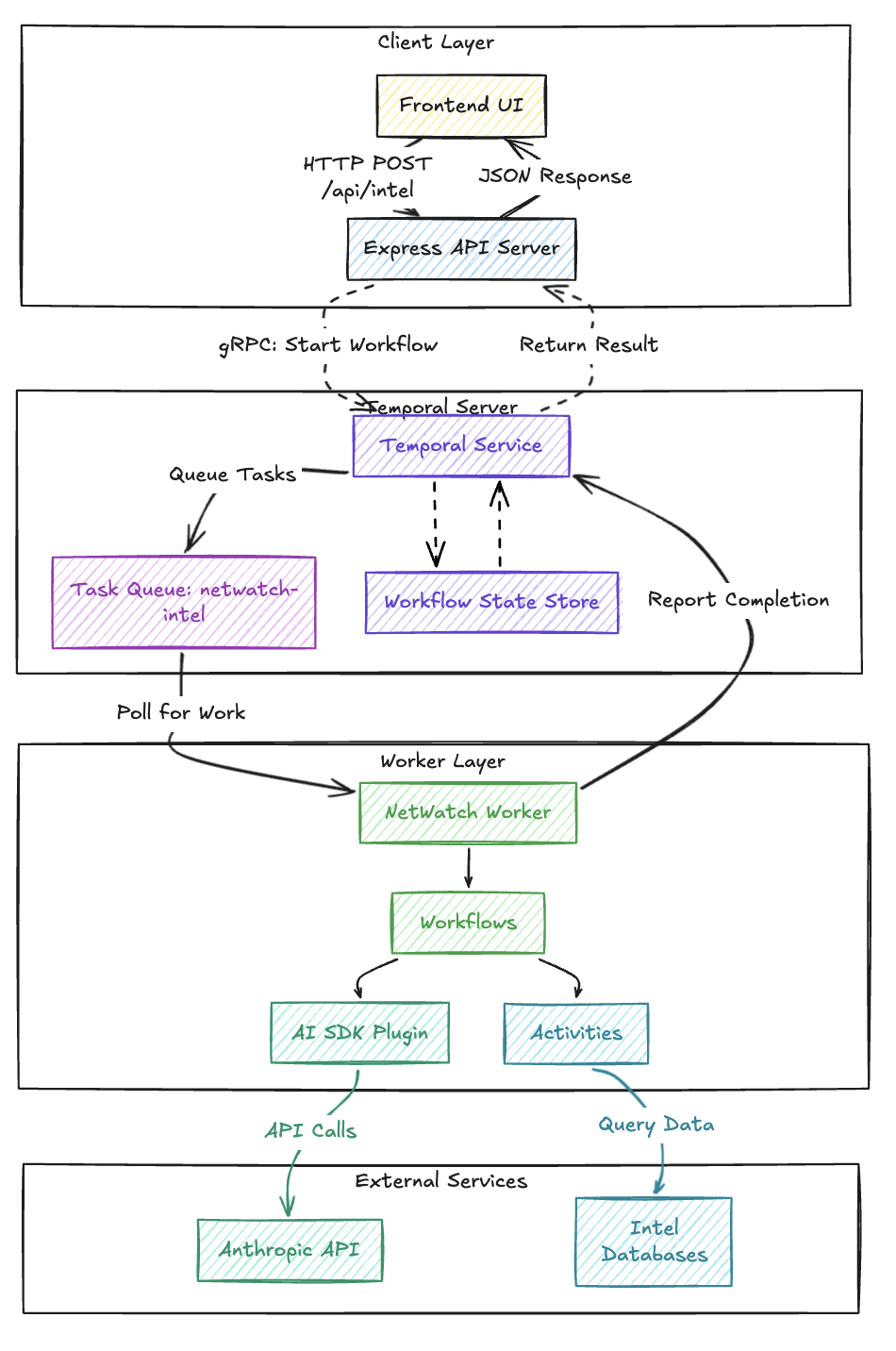
The server code shows how thin the HTTP layer is. It connects to Temporal once at startup, then each request just starts a workflow and waits for the result:
import { Client, Connection } from '@temporalio/client';
import { netwatchIntelAgent } from './workflows/netwatch-agent';

async function main() {
  // Establish gRPC connection to Temporal Server
  const connection = await Connection.connect({
    address: process.env.TEMPORAL_ADDRESS || 'localhost:7233',
  });
  const client = new Client({ connection });

  // Express route handler
  app.post('/api/intel', async (req, res) => {
    const { query, priority, requester } = req.body;
    const requestId = crypto.randomUUID();

    // Start workflow execution
    const handle = await client.workflow.start(netwatchIntelAgent, {
      taskQueue: 'netwatch-intel',
      workflowId: `netwatch-${requestId}`,
      args: [{ requestId, query, requester, priority }],
    });

    // Wait for workflow completion
    const result = await handle.result();
    res.json(result);
  });
}
The server never handles API keys or makes LLM calls directly. This separation has practical consequences worth calling out:
- API credentials only exist on worker nodes. The server has no access to
ANTHROPIC_API_KEY. If the server is compromised, your model provider credentials are not exposed. - The server scales independently from AI processing. You can run ten API servers behind a load balancer while keeping a small pool of GPU-attached workers. Neither side blocks the other.
- Multiple servers can start workflows that any worker can process. Temporal acts as the routing layer. Workers don’t need to know which server originated the request.
The Worker: Where AI Execution Happens
The worker is where the AI magic happens. It’s configured with the AiSdkPlugin that enables durable LLM execution:
import { Worker, NativeConnection, bundleWorkflowCode } from '@temporalio/worker';
import { AiSdkPlugin } from '@temporalio/ai-sdk';
import { anthropic } from '@ai-sdk/anthropic';

async function run() {
  const connection = await NativeConnection.connect({
    address: process.env.TEMPORAL_ADDRESS || 'localhost:7233',
  });

  const workflowBundle = await bundleWorkflowCode({
    workflowsPath: path.resolve(__dirname, '../workflows/index.ts'),
    workflowInterceptorModules: [path.resolve(__dirname, '../workflows/interceptors.ts')],
  });

  const worker = await Worker.create({
    connection,
    namespace: 'default',
    taskQueue: 'netwatch-intel',
    workflowBundle,
    activities: netwatchActivities,
    plugins: [
      new AiSdkPlugin({
        modelProvider: anthropic,
      }),
    ],
  });

  await worker.run();
}
The AiSdkPlugin configuration specifies Anthropic as the model provider. This is the only place where the Anthropic SDK is configured, and consequently, the only place that needs the ANTHROPIC_API_KEY environment variable.
Tools as Temporal Activities
In the NetWatch system, AI agents have access to five intelligence-gathering tools. Each tool is implemented as a Temporal Activity, which means every tool invocation gets the same durability guarantees as the LLM calls themselves.
The activities are defined in netwatch-activities.ts:
export async function queryCorporateIntel(input: { corporation: string }): Promise<object> {
  console.log(`[NETWATCH] Querying corporate intel: ${input.corporation}`);
  const corp = input.corporation.toLowerCase();
  const intel = corporateIntel[corp];

  if (!intel) {
    return {
      error: 'Corporation not found in database',
      available: Object.keys(corporateIntel),
    };
  }
  return intel;
}

export async function analyzeThreat(input: {
  target: string;
  operation_type: string;
}): Promise<ThreatAssessment> {
  console.log(`[NETWATCH] Analyzing threat: ${input.target} - ${input.operation_type}`);
  // Threat analysis logic...
  return {
    target: input.target,
    threat_level: threatLevel,
    summary: `Threat assessment for ${input.operation_type} targeting ${input.target}`,
    recommendations,
  };
}
These activities are then wrapped as AI SDK tools in the workflow using proxyActivities:
const {
  queryCorporateIntel,
  queryRunnerProfile,
  checkSecurityClearance,
  analyzeThreat,
  searchIncidentReports,
} = proxyActivities<typeof activities>({
  startToCloseTimeout: '60 seconds',
  retry: {
    initialInterval: '1 second',
    maximumAttempts: 3,
  },
});

function createTools(toolsUsed: string[]) {
  return {
    queryCorporateIntel: tool({
      description: 'Query the corporate intelligence database for information about a specific corporation',
      inputSchema: z.object({
        corporation: z.string().describe('The name of the corporation to query'),
      }),
      execute: async (input) => {
        toolsUsed.push('queryCorporateIntel');
        return await queryCorporateIntel(input);
      },
    }),
    analyzeThreat: tool({
      description: 'Analyze the threat level for a specific target or operation',
      inputSchema: z.object({
        target: z.string().describe('The target of the operation'),
        operation_type: z.string().describe('Type of operation'),
      }),
      execute: async (input) => {
        toolsUsed.push('analyzeThreat');
        return await analyzeThreat(input);
      },
    }),
    // ... additional tools
  };
}
When the LLM decides to call a tool, the execution flows through Temporal’s activity system:
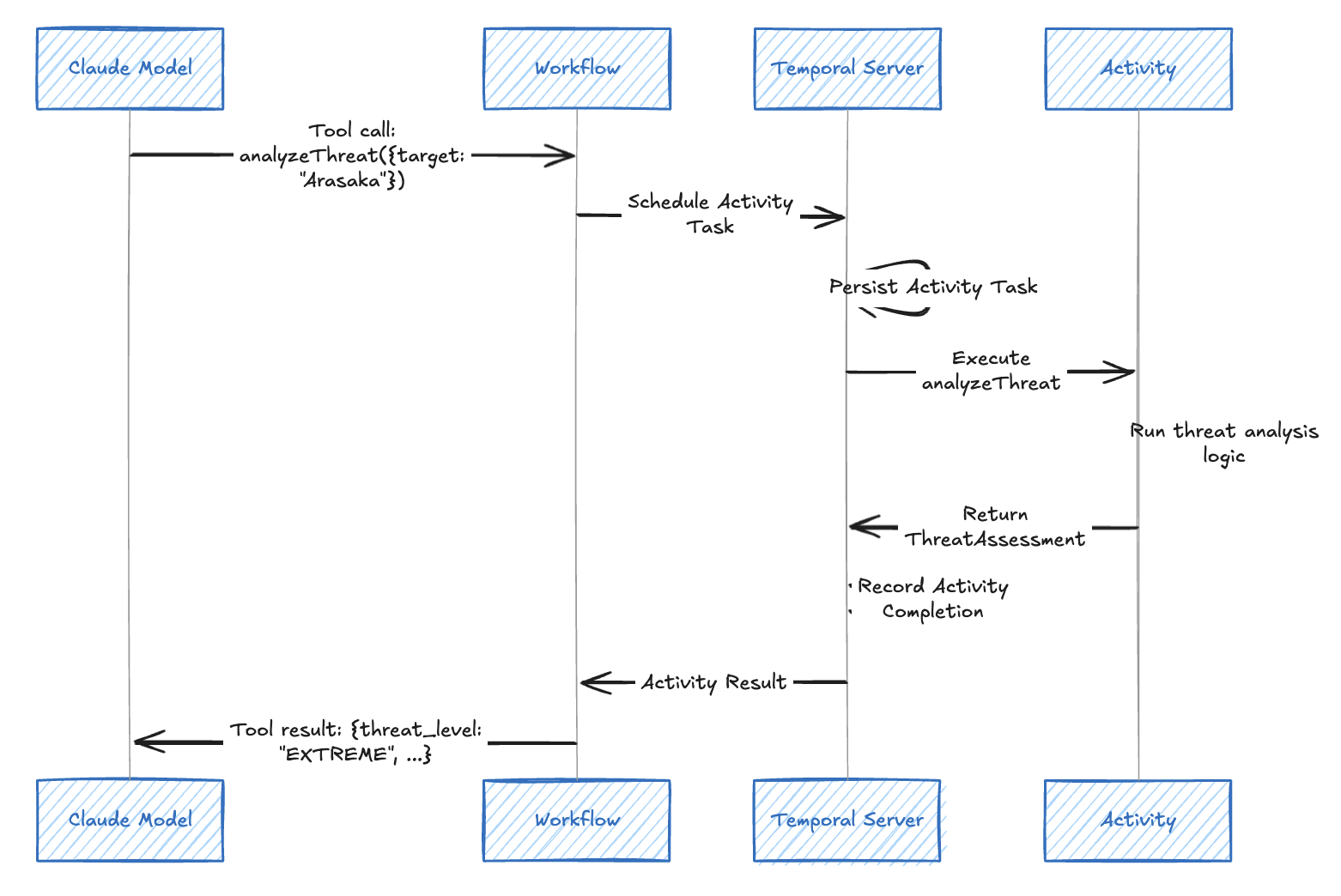
If the activity fails (network error, database timeout), Temporal automatically retries it according to the configured retry policy. The workflow doesn’t need any error handling code for transient failures.
The Scatter/Gather Pattern for Multi-Model Queries
The most interesting architectural pattern in NetWatch is the scatter/gather approach to multi-model intelligence analysis. Rather than querying a single model, the workflow dispatches the same query to three different Claude models simultaneously and aggregates the results.
const CLAUDE_MODELS = {
  haiku: {
    id: 'claude-haiku-4-5-20251001',
    name: 'Haiku 4.5',
    tier: 'Fastest',
  },
  sonnet: {
    id: 'claude-sonnet-4-5-20250929',
    name: 'Sonnet 4.5',
    tier: 'Balanced',
  },
  opus: {
    id: 'claude-opus-4-5-20251101',
    name: 'Opus 4.5',
    tier: 'Most Capable',
  },
};

export async function netwatchIntelAgent(request: IntelRequest): Promise<IntelResponse> {
  const startTime = Date.now();

  // SCATTER: Query all three models in parallel
  const modelPromises = [
    queryModel('haiku', request.query),
    queryModel('sonnet', request.query),
    queryModel('opus', request.query),
  ];

  // Wait for all models (don't fail if one fails)
  const analyses = await Promise.all(modelPromises);

  // GATHER: Aggregate results
  const successCount = analyses.filter((a) => a.success).length;

  // Determine classification based on tools used
  const allToolsUsed = analyses.flatMap((a) => a.toolsUsed);
  let classification: IntelResponse['classification'] = 'PUBLIC';
  if (allToolsUsed.includes('analyzeThreat')) {
    classification = 'CLASSIFIED';
  }

  return {
    requestId: request.requestId,
    analyses,
    totalProcessingTime: Date.now() - startTime,
    classification,
  };
}
The queryModel function handles the individual LLM call:
async function queryModel(
  modelKey: keyof typeof CLAUDE_MODELS,
  query: string
): Promise<ModelAnalysis> {
  const modelConfig = CLAUDE_MODELS[modelKey];
  const startTime = Date.now();
  const toolsUsed: string[] = [];

  try {
    const result = await generateText({
      model: temporalProvider.languageModel(modelConfig.id),
      prompt: query,
      system: NETWATCH_SYSTEM_PROMPT,
      tools: createTools(toolsUsed),
      stopWhen: stepCountIs(10),
    });

    return {
      model: modelKey,
      modelName: modelConfig.name,
      modelTier: modelConfig.tier,
      analysis: result.text,
      toolsUsed,
      processingTime: Date.now() - startTime,
      success: true,
    };
  } catch (error) {
    return {
      model: modelKey,
      modelName: modelConfig.name,
      modelTier: modelConfig.tier,
      analysis: '',
      toolsUsed,
      processingTime: Date.now() - startTime,
      success: false,
      error: error instanceof Error ? error.message : 'Unknown error',
    };
  }
}
The scatter/gather flow looks like this across each boundary.
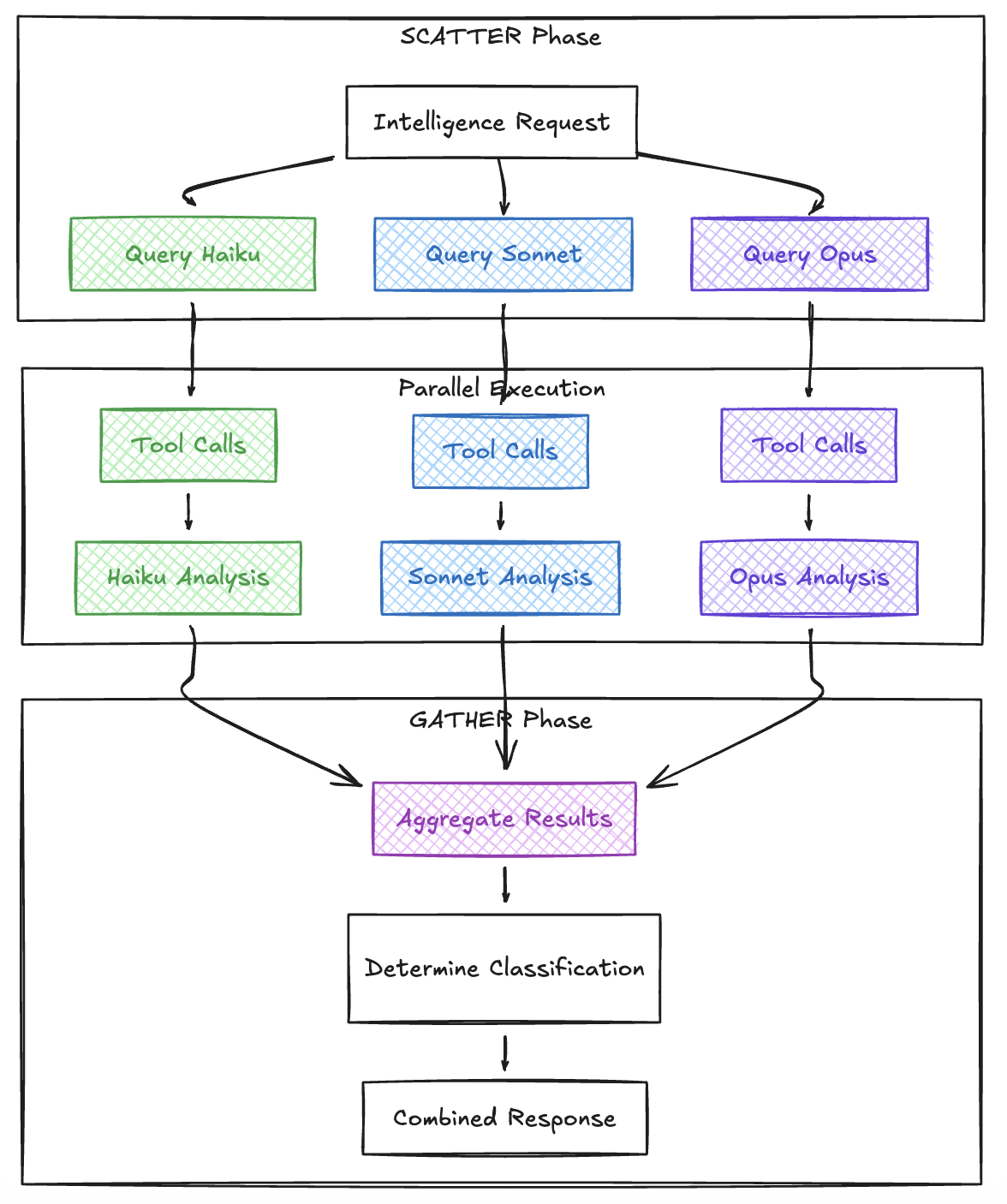
This pattern provides several benefits:
- Comparative Analysis: See how different capability tiers approach the same problem
- Redundancy: If one model fails, the others still provide results
- Cost Optimization: Compare fast/cheap (Haiku) vs slow/capable (Opus) for your use case
- Parallel Execution: All three queries run simultaneously, reducing total latency
The obvious tradeoff is cost. You are burning 3x the tokens on every query, and that adds up fast in production. Multi-model scatter/gather makes sense when the decision being informed is high-stakes enough to justify the expense, or when you are in an evaluation phase and actively trying to determine which model tier is sufficient for your workload. Once you’ve established that Sonnet handles 95% of your queries well enough, you can drop to a single-model call and reserve the full scatter/gather for edge cases or periodic quality audits. Temporal makes this easy to switch between since you’re just changing which queryModel calls go into the Promise.all array.
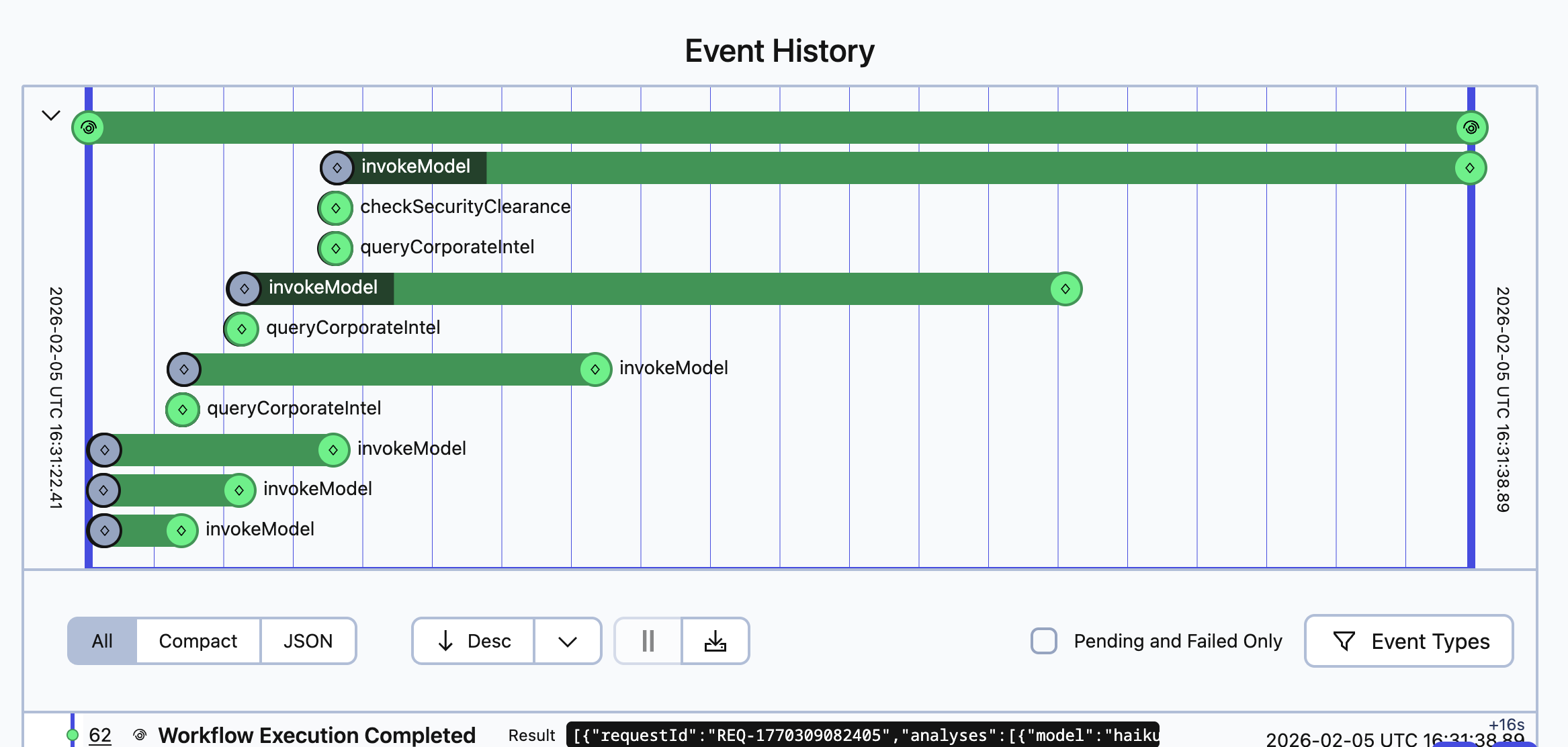
Observability in Temporal
One of the most powerful aspects of running AI agents in Temporal is the built-in observability. Every workflow execution, activity invocation, and state change is recorded in Temporal’s event history.
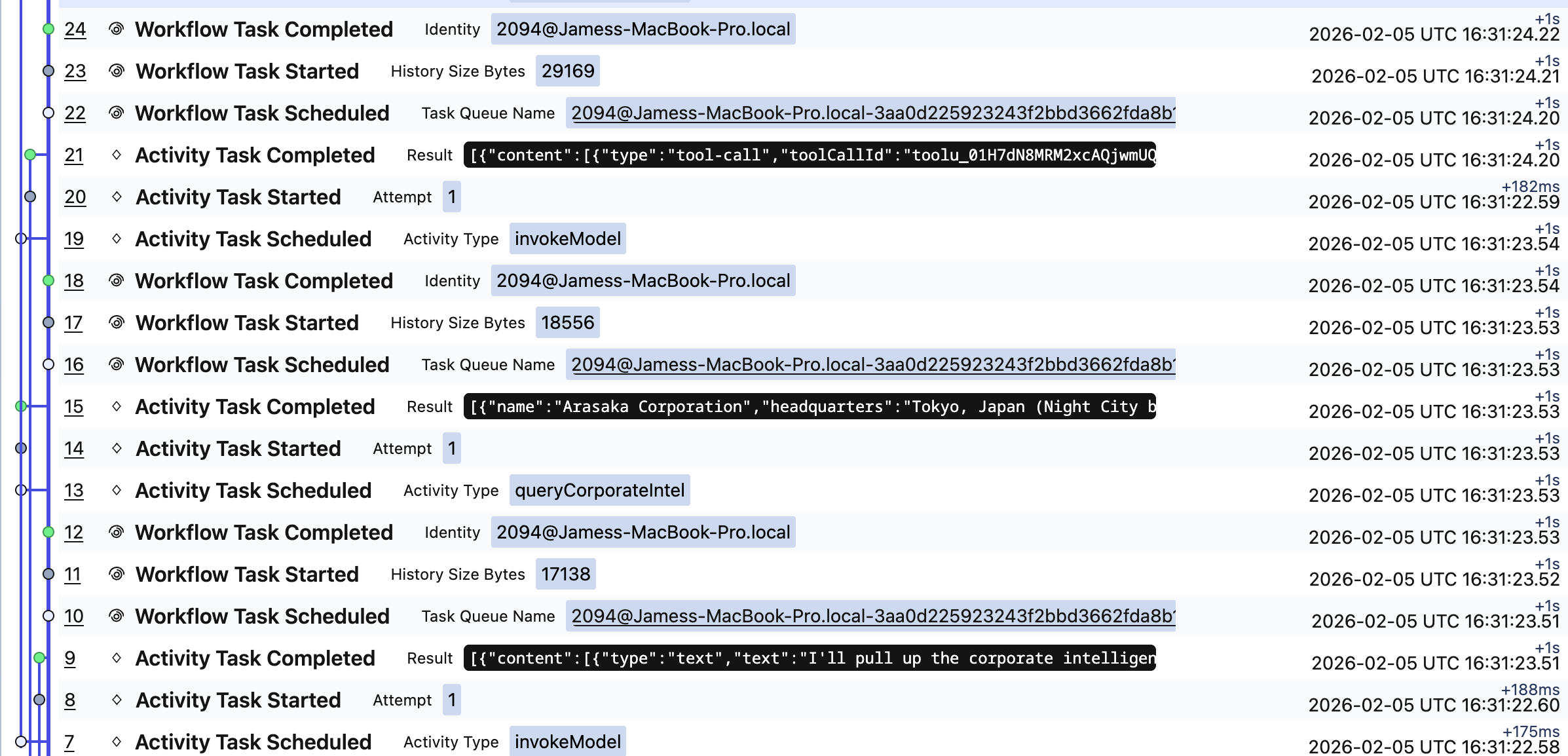
The event history shows:
- When each model query started and completed
- Which tools each model decided to use
- The exact inputs and outputs of every activity
- Retry attempts if any calls failed
- Total execution time and latency breakdowns
This visibility is invaluable for debugging AI agent behavior. When an agent makes unexpected tool calls or produces surprising results, you can replay the exact sequence of events to understand what happened.
Try It Yourself
The complete project is available at github.com/jamescarr/night-city-services.
# Clone the repo
git clone https://github.com/jamescarr/night-city-services.git
cd night-city-services

# Start Temporal server + Night City services
just up

# Install dependencies
just install

# Start the worker (requires ANTHROPIC_API_KEY)
just netwatch-worker

# Start the API server (in another terminal)
just netwatch-server
Or run just netwatch to start everything (infrastructure, worker, and server) in one command.
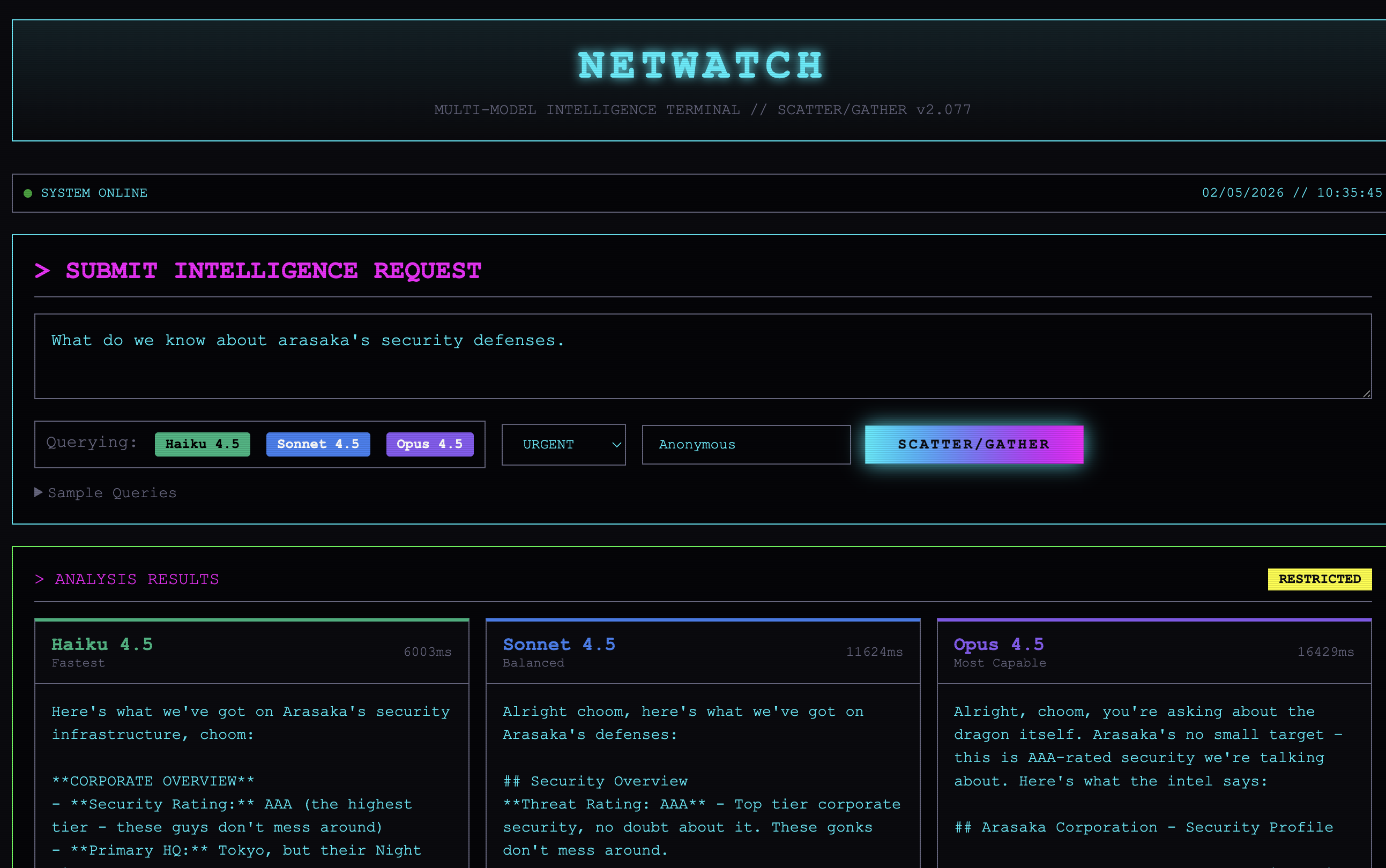
Open http://localhost:3000 and submit an intelligence query. Try queries like:
- “What do we know about Arasaka? I need intel for a potential job.”
- “I need a threat assessment for an extraction operation at Biotechnica Flats.”
- “Give me everything you have on the runner known as V.”
How This Fits the Cookbook
Temporal’s AI Cookbook documents several patterns for building durable AI systems. NetWatch combines a few of them:
| Pattern | NetWatch Implementation |
|---|---|
| Basic Agentic Loop with Tool Calling | Each model runs an agent loop with tools |
| Scatter-Gather | Parallel queries to different models and aggregate results |
| Durable Agent with Tools | Activities as tools with automatic retries |
The TypeScript AI SDK integration is currently in Public Preview. The @temporalio/ai-sdk package wraps Vercel’s AI SDK, making durable AI agents feel like writing normal code. I didn’t hit any rough edges with it at all but something might likely pop up if preparing for production usage.
These patterns compose naturally. A scatter/gather across models could feed into a saga that takes action based on the aggregated analysis, with compensations if any downstream step fails. Or an agentic loop could use scatter/gather internally when it needs to cross-reference multiple sources before making a tool call. I’m planning to explore some of these compositions in future posts, along with comparing how these same patterns translate to other durable execution frameworks.
Wrapping Up
Building durable AI agents with Temporal provides guarantees that are difficult to achieve otherwise:
Automatic Durability: LLM calls become Activities with built-in retry logic. No manual error handling required for transient failures.
Clean Separation: API credentials stay on workers. Clients only need to know workflow names and Task Queues.
Observable by Default: Every step of agent execution is recorded and can be inspected through Temporal’s UI.
Familiar Developer Experience: The code looks almost identical to standard Vercel AI SDK usage. The
temporalProvider.languageModel()wrapper is the only change.Pattern Support: Complex patterns like scatter/gather work naturally with Temporal’s parallel execution model.
Production-ready AI agents don’t require reinventing infrastructure. Temporal provides the durable execution layer, letting you focus on the agent logic itself.