In my previous posts, we covered the Saga pattern for distributed transactions and Scatter-Gather for parallel queries. Now let’s tackle the Process Manager pattern, a state machine that can respond to external events in real-time.
The Pattern
A Process Manager maintains state across a long-running process and can react to external signals. Unlike a simple workflow that runs start-to-finish, a process manager can:
- Wait for external confirmation before proceeding
- React to signals that change the workflow’s behavior
- Expose its current state via queries
Perfect for coordinating a shadowrun against Arasaka Tower.
The Domain: Heist Coordination
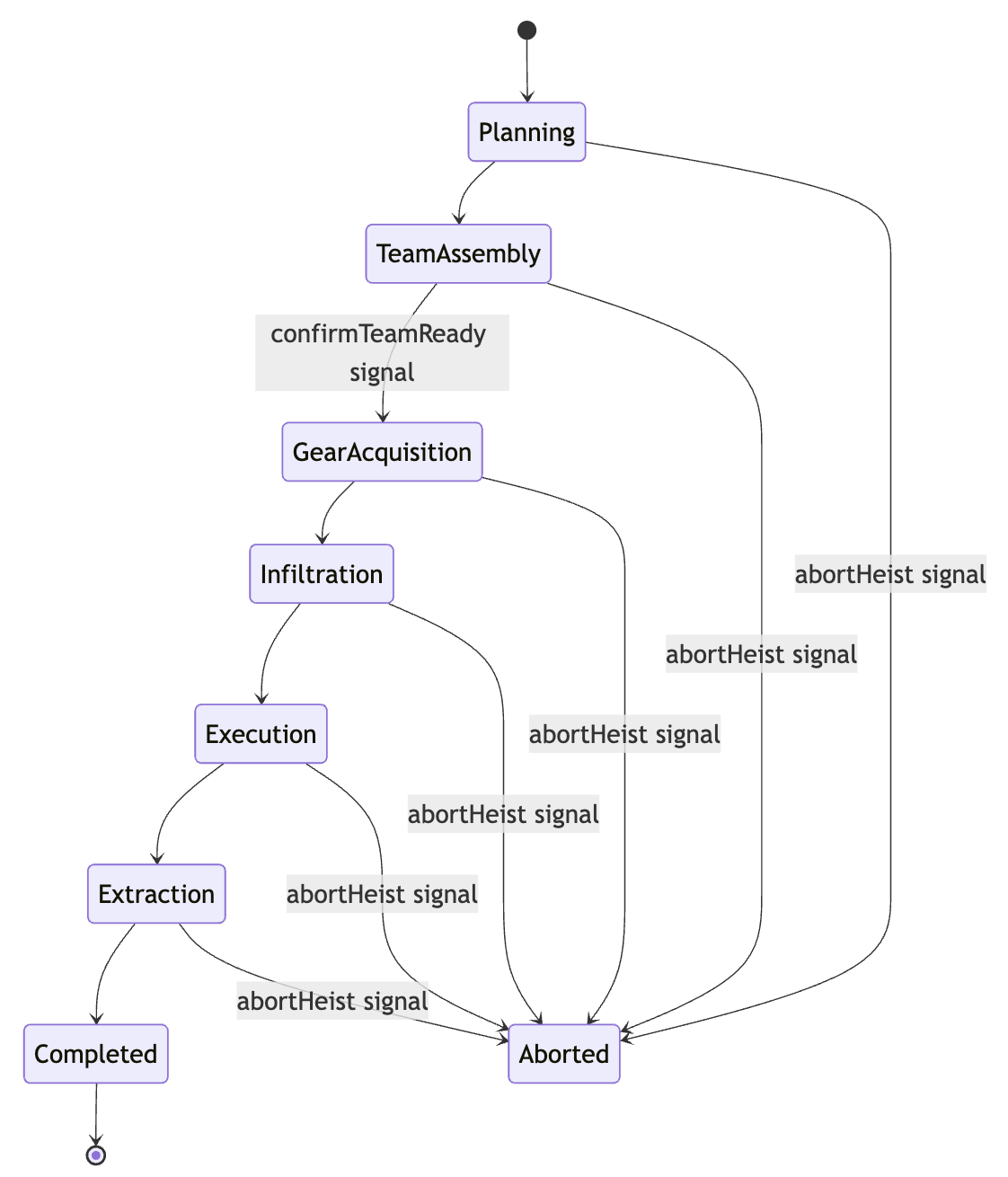
Signals (external events that affect the workflow):
abortHeist(reason)- Emergency abort at any phaseupdateAlertLevel(delta, source)- External intel about securityconfirmTeamReady()- Gate team assembly phase
Queries (inspect state without affecting it):
getHeistState()- Current phase, alert level, team status
Signals and Queries in Temporal
Temporal’s message passing system is what makes the Process Manager pattern practical. A running workflow can receive external messages without polling, and clients can inspect workflow state at any time.
Defining Messages
Messages are defined using defineSignal and defineQuery, then registered with setHandler:
import { defineSignal, defineQuery, setHandler, condition } from '@temporalio/workflow';

// Define signals - external events that affect the workflow
export const abortHeistSignal = defineSignal<[string]>('abortHeist');
export const updateAlertLevelSignal = defineSignal<[number, string]>('updateAlertLevel');
export const confirmTeamReadySignal = defineSignal('confirmTeamReady');

// Define queries - inspect workflow state without affecting it
export const getHeistStateQuery = defineQuery<HeistProcess | null>('getHeistState');
Under the hood, these are simple factory functions that return typed definition objects. Looking at the SDK source:
// From sdk-typescript workflow.ts
export function defineSignal<Args extends any[] = []>(name: string): SignalDefinition<Args> {
  return { type: 'signal', name };
}
The type information flows through to give you compile-time safety when sending signals from clients.
Signal vs Query Semantics
The two message types have fundamentally different semantics:
| Aspect | Signal | Query |
|---|---|---|
| Purpose | Change workflow state | Read workflow state |
| Blocking | Fire-and-forget (returns immediately) | Waits for response |
| Can mutate state | Yes | No |
| Can return value | No | Yes |
| Can be async | Yes | No |
| Recorded in history | Yes (WorkflowExecutionSignaled) | No |
Signals are recorded as WorkflowExecutionSignaled events in the workflow history, making them durable. If a worker crashes after receiving a signal but before processing it, the signal will be replayed when the workflow resumes.
The Workflow
The workflow uses Temporal’s CancellationScope to handle aborts. When the abort signal arrives, it cancels the main execution scope, which interrupts any running activity (if it heartbeats). Emergency extraction then runs in a nonCancellable scope to ensure cleanup completes.
import {
  proxyActivities,
  defineSignal,
  defineQuery,
  setHandler,
  condition,
  CancellationScope,
  isCancellation,
} from '@temporalio/workflow';

// Activities with heartbeat support for mid-execution cancellation
const act = proxyActivities<typeof activities>({
  startToCloseTimeout: '60 seconds',
  heartbeatTimeout: '10 seconds',
});

export async function heistProcessManager(config: HeistConfig): Promise<HeistProcess> {
  let heist: HeistProcess | null = null;
  let teamConfirmed = false;
  let abortReason = '';

  // Create a scope we can cancel when abort signal arrives
  const heistScope = new CancellationScope();

  setHandler(abortHeistSignal, (reason: string) => {
    abortReason = reason;
    heistScope.cancel(); // Cancel the main workflow scope
  });

  setHandler(confirmTeamReadySignal, () => {
    teamConfirmed = true;
  });

  setHandler(getHeistStateQuery, () => heist);

  try {
    heist = await heistScope.run(async () => {
      // Phase 1: Planning
      let h = await act.initializeHeist(config.heistId, config.codename, config.target, config.budget);

      // Phase 2: Team Assembly
      h = await act.transitionToTeamAssembly(config.heistId);
      for (const member of config.team) {
        h = await act.recruitTeamMember(config.heistId, member);
      }
      await condition(() => teamConfirmed, '5 minutes');

      // Phase 3: Gear Acquisition
      h = await act.transitionToGearAcquisition(config.heistId);
      for (const gear of config.gear) {
        h = await act.acquireGear(config.heistId, gear.name, gear.cost);
      }

      // Phase 4-6: Infiltration, Execution, Extraction
      h = await act.beginInfiltration(config.heistId);
      h = await act.executeObjective(config.heistId);
      h = await act.extractTeam(config.heistId);
      return await act.completeHeist(config.heistId);
    });

    return heist;

  } catch (err) {
    if (isCancellation(err)) {
      // Cleanup runs in nonCancellable scope
      heist = await CancellationScope.nonCancellable(async () => {
        return await act.abortHeist(config.heistId, abortReason);
      });
      return heist;
    }
    throw err;
  }
}
Full code: heist-process-manager.ts
How Cancellation Works
When the abortHeistSignal arrives, heistScope.cancel() propagates a cancellation request through the scope. The currently running activity will throw CancelledFailure at its next heartbeat. The isCancellation(err) check catches this, and emergency extraction runs in a nonCancellable scope so it always completes.
This is Temporal’s idiomatic approach to workflow cancellation:
- Main logic runs in a cancellable scope
- Signal handler cancels the scope
- Cleanup runs in
CancellationScope.nonCancellable()
Activities must heartbeat to be cancellable mid-execution. Without heartbeating, cancellation only takes effect between activity calls. Our activities call Context.current().heartbeat() periodically during long operations:
async function heartbeatSleep(ms: number, details: string): Promise<void> {
  const ctx = Context.current();
  let remaining = ms;
  while (remaining > 0) {
    await sleep(Math.min(remaining, 1000));
    remaining -= 1000;
    ctx.heartbeat(details); // Throws if cancelled
  }
}
For more details, see Cancellation in Temporal.
How Signal Handlers Execute
Signal handlers execute synchronously at specific yield points. They don’t interrupt running code directly.
When the workflow awaits something (an activity, a timer, a condition), Temporal checks for pending signals and executes their handlers before resuming the main workflow code. From the Temporal documentation:
Signal and Update handlers run interleaved with the main Workflow, with switching occurring between them at
awaitcalls.
This means:
- Signal handlers run between workflow
awaitpoints - The handler can call
heistScope.cancel()to trigger cancellation - Cancellation propagates to the currently running activity at its next heartbeat
The key insight: the signal handler itself doesn’t interrupt the activity. It cancels the scope, and the activity notices the cancellation when it heartbeats.
Now let’s look at how external clients interact with this workflow.
Sending Signals from the Client
The client uses a WorkflowHandle to interact with a running workflow:
const handle = await client.workflow.start(heistProcessManager, {
  taskQueue: 'night-city-services',
  workflowId: `heist-${Date.now()}`,
  args: [config],
});

// Send signal to confirm team is ready
await handle.signal(confirmTeamReadySignal);

// Query current state
const state = await handle.query(getHeistStateQuery);
console.log(`Current phase: ${state?.currentPhase}`);

// Abort if things go sideways
await handle.signal(abortHeistSignal, 'Security sweep detected');
Signal Delivery Semantics
When you call handle.signal(), the call returns as soon as the Temporal server accepts the signal. It does not wait for the workflow to process it. This is fire-and-forget semantics.
The signal is durably recorded in the workflow history. Even if:
- The worker is down when the signal arrives
- The workflow is currently executing an activity
- Network issues cause delays
The signal will eventually be delivered and processed. This durability is what makes signals so powerful for long-running processes.
Querying State
handle.query() is synchronous and blocking. The client waits for the workflow to respond. Queries:
- Don’t modify workflow state
- Aren’t recorded in history
- Require a worker to be online
- Can be sent to completed workflows (within the retention period)
Running the Demo
Let’s see it in action. The demo starts a heist, sends the team confirmation signal, then sends an abort signal mid-operation.
Running pnpm run heist:abort:
═══════════════════════════════════════════════════════════════════════
HEIST PROCESS MANAGER - Operation "The Heist"
═══════════════════════════════════════════════════════════════════════

▶ PHASE 1: PLANNING
[HEIST] ✓ Operation initialized. Budget: €$50000

▶ PHASE 2: TEAM ASSEMBLY
[HEIST] ✓ Jackie Welles recruited
[HEIST] ✓ T-Bug recruited
[HEIST] ✓ Delamain recruited
✓ Team ready confirmed

▶ PHASE 3: GEAR ACQUISITION
[HEIST] ✓ Acquired Stealth Suits
[HEIST] ✓ Acquired Quickhack Deck

▶ PHASE 4: INFILTRATION
[HEIST] Beginning infiltration...

⚠ ABORT SIGNAL: Security sweep detected

──────────────────────────────────────────────────────────────────────
INITIATING EMERGENCY EXTRACTION
──────────────────────────────────────────────────────────────────────
[HEIST] ✓ Jackie Welles extracted
[HEIST] ✓ T-Bug extracted
[HEIST] ⚠ Delamain MIA

═══════════════════════════════════════════════════════════════════════
HEIST ABORTED
Final Phase: aborted
Alert Level: 15
Budget Used: €$20000/€$50000
Team: 2/3 extracted
MIA: Delamain
═══════════════════════════════════════════════════════════════════════
The abort signal cancels the workflow scope during infiltration. Because beginInfiltration heartbeats during its execution, cancellation interrupts it mid-activity. Emergency extraction runs in a nonCancellable scope, ensuring cleanup always completes.
The condition Function
The condition function lets any Temporal workflow block until a predicate becomes true. For Process Manager, it’s how we implement gates:
await condition(() => teamConfirmed, '5 minutes');
This blocks the workflow until:
teamConfirmedbecomes true (via signal), OR- 5 minutes pass (timeout)
Why condition Matters
The workflow is not actively polling. This is crucial for efficiency. From the Temporal community:
Temporal doesn’t repeatedly execute the workflow and check the lambda. Instead,
condition()blocks the workflow without consuming resources. The workflow remains suspended until either the condition evaluates to true or a timeout occurs.
Under the hood, Temporal:
- Evaluates your predicate function immediately
- If false, schedules a timer (if timeout provided) and suspends the workflow
- Re-evaluates the predicate after every signal is processed
- Resumes the workflow when the predicate returns true or timeout expires
This is why condition works so well with signals. When a signal handler mutates state (teamConfirmed = true), Temporal immediately re-evaluates any waiting conditions.
Return Value
The return type differs based on whether you provide a timeout:
// With timeout: returns boolean (true = condition met, false = timed out)
const ready = await condition(() => teamConfirmed, '5 minutes');
if (!ready) {
  // Timed out waiting for team confirmation
}

// Without timeout: returns void (blocks indefinitely)
await condition(() => teamConfirmed);
// Only reaches here when teamConfirmed is true
Alternative: The Trigger Pattern
For simple “wait for signal” cases, you can use Trigger combined with Promise.race:
import { Trigger, sleep, defineSignal, setHandler } from '@temporalio/workflow';

const confirmSignal = defineSignal('confirm');
const trigger = new Trigger<boolean>();

setHandler(confirmSignal, () => trigger.resolve(true));

// Wait for signal OR timeout
const confirmed = await Promise.race([
  trigger,
  sleep('30 days').then(() => false)
]);
This pattern is useful when you need to return a value from the signal or when modeling more complex async flows. See the Durable Timers documentation for more patterns.
Debugging Signals
Every signal sent to any Temporal workflow is recorded in the workflow history as a WorkflowExecutionSignaled event. The Temporal UI shows exactly when each signal arrived and what payload it contained. For Process Manager workflows that may run for days or weeks, this audit trail is invaluable. If something goes wrong, you can trace back through the event history to see which signals were sent, when, and in what order.
Try It Yourself
git clone https://github.com/jamescarr/night-city-services.git
cd night-city-services
docker compose up -d
pnpm install
pnpm run worker       # Terminal 1
pnpm run heist        # Terminal 2 - Full heist (runs to completion)
pnpm run heist:abort  # Terminal 2 - Heist with abort mid-operation
The heist:abort script sends the abort signal during infiltration, demonstrating how CancellationScope interrupts the running activity and triggers emergency extraction in a nonCancellable scope.
When to Use Process Manager
The Process Manager pattern excels in several scenarios:
Long-Running Workflows
Workflows that span hours, days, or even years. Traditional request/response patterns break down when processes “don’t have a definite endpoint”. A heist that takes weeks to plan, an insurance claim that takes months to settle, or an employee onboarding process that spans their first 90 days. Temporal’s durable execution means your workflow survives infrastructure failures, deployments, and restarts without losing state.
Human-in-the-Loop (HITL)
This is one of the most requested workflow patterns. Temporal’s HITL documentation shows how signals enable workflows to pause indefinitely waiting for human decisions without consuming resources. Common use cases:
- Approval workflows: Manager approves expense report, legal reviews contract
- Exception handling: Human resolves edge cases that automated logic can’t handle
- AI oversight: Human reviews and approves AI-generated actions before execution
When a workflow waits on condition() for a human signal, it’s not polling or holding a thread. It’s durably suspended. If your infrastructure restarts while waiting for approval, the workflow resumes exactly where it left off, approval state intact.
State Machines with External Events
When your process has well-defined states and transitions triggered by external events. Order fulfillment (placed → paid → shipped → delivered), loan applications (submitted → under review → approved/denied), or incident response (detected → triaged → mitigating → resolved). The state diagram in this post’s domain section is a classic example. Queries become particularly useful here for exposing current phase to dashboards and monitoring tools.
Further Reading
- Cancellation in Temporal - Scopes, propagation, and cleanup patterns
- Message Passing - Signals, queries, and updates
- Heartbeating Activities - Why activities need heartbeats for cancellation
- Safe Message Handler Patterns - Production patterns for signals
Wrapping Up the Series
Over these three posts, we’ve explored how Temporal implements classic Enterprise Integration Patterns:
- Saga Pattern - Distributed transactions with compensating actions
- Scatter-Gather - Parallel queries with aggregation
- Process Manager - State machines with signals and queries
Temporal handles the hard parts (durability, retries, visibility) while letting you write what looks like normal code. The patterns are timeless; Temporal just makes them tractable.