I first encountered NATS a couple years back while experimenting with OpenFaaS. If you’re not familiar, OpenFaaS is a serverless functions framework that uses NATS as its default message queue for async function invocations. At the time, I noted NATS as “that fast pub/sub thing” and moved on. It seemed like a lightweight messaging broker, but not something I needed to dig into.
What brought NATS back onto my radar was the Jepsen analysis published late last year. If you’re not familiar with Jepsen, it’s the gold standard for distributed systems testing… they put databases and message brokers through absolute hell to see how they behave under failure conditions. When Jepsen publishes an analysis, I pay attention.
The NATS report was fascinating. It found real issues with data durability under certain failure modes, but it also painted a picture of a system that’s genuinely trying to provide strong guarantees while remaining performant. JetStream, the persistence layer, transforms NATS from a simple pub/sub into a proper message broker with delivery guarantees.
So I built a small project to learn how JetStream actually works.
Core NATS vs JetStream
First, the distinction matters. Core NATS is a pure pub/sub system—blazingly fast, but with fire-and-forget semantics. If your subscriber isn’t connected when a message is published, it’s gone. Perfect for real-time updates where missing a message doesn’t matter.
JetStream is NATS’s persistence layer. It adds:
- Streams: Durable message stores that capture messages on specific subjects
- Consumers: Stateful views of streams that track delivery and acknowledgment
- Replay: Ability to replay historical messages
- Exactly-once semantics: With message deduplication
Think of Core NATS like Redis Pub/Sub—blazing fast, but if your subscriber isn’t connected, the message vanishes. JetStream is closer to Kafka—messages are persisted to a log and consumers can replay from any point.
The File Trash Service
To explore these concepts, I built a simple but realistic service: a file trash processor. When users delete files, we need to:
- Capture the deletion event
- Record it in a database
- Emit a downstream event for other services
Here’s the flow:
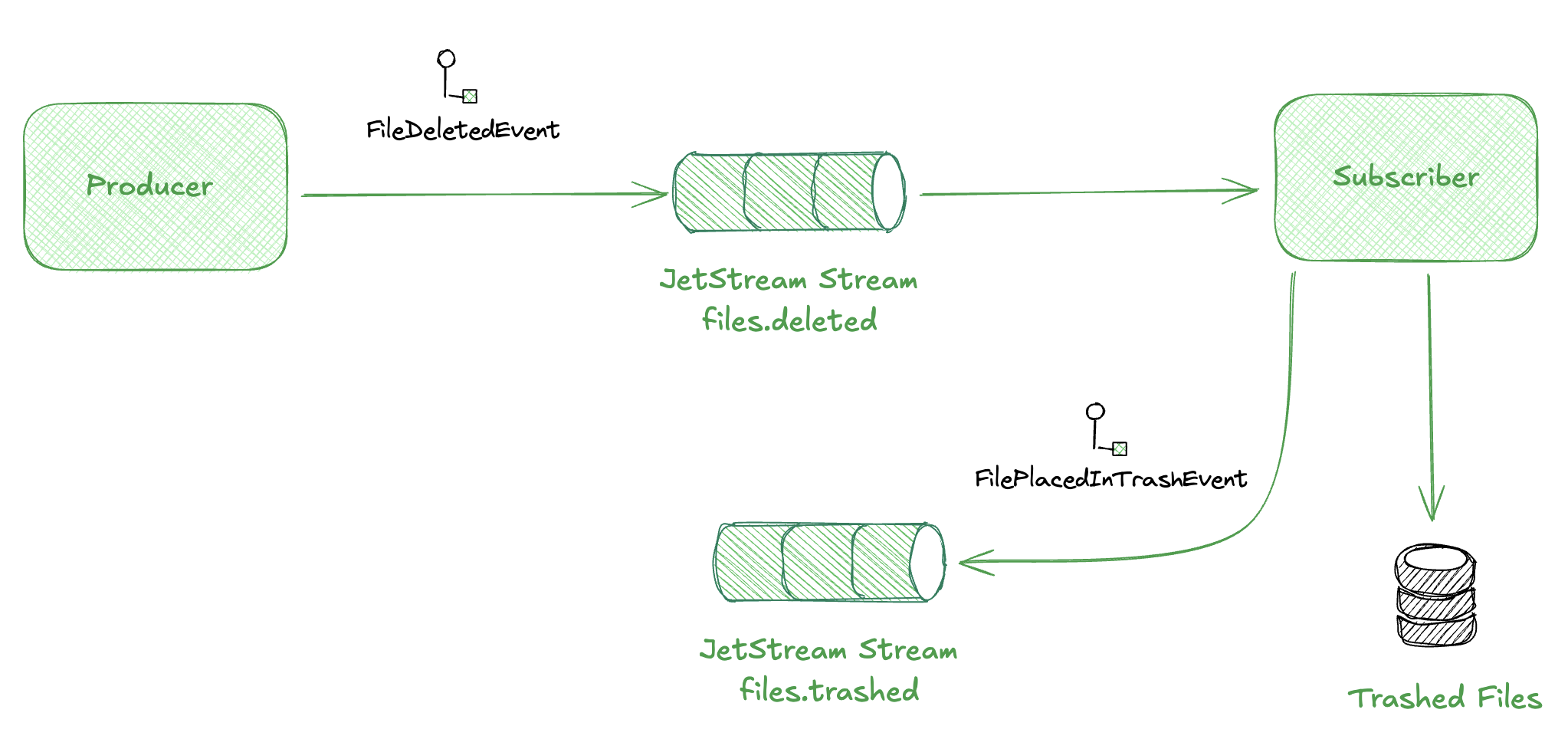
The publisher simulates file deletions. The subscriber processes them, stores a record, and emits a downstream event. JetStream ensures nothing gets lost between these steps.
Setting Up JetStream
Here’s how we configure the NATS connection and ensure our stream exists:
import {
  connect,
  NatsConnection,
  JetStreamManager,
  JetStreamClient,
  RetentionPolicy,
  StorageType,
  AckPolicy,
  DeliverPolicy,
} from "nats";

export async function setupJetStream(nc: NatsConnection) {
  const jsm = await nc.jetstreamManager();
  const js = nc.jetstream();
  return { jsm, js };
}

export async function ensureStream(
  jsm: JetStreamManager,
  streamName: string,
  subjects: string[]
) {
  try {
    await jsm.streams.info(streamName);
    console.log(`Stream "${streamName}" already exists`);
  } catch {
    await jsm.streams.add({
      name: streamName,
      subjects,
      retention: RetentionPolicy.Limits,
      max_bytes: 1024 * 1024 * 100, // 100MB
      max_age: 7 * 24 * 60 * 60 * 1_000_000_000, // 7 days in nanoseconds
      storage: StorageType.File,
      num_replicas: 1,
    });
    console.log(`Created stream "${streamName}"`);
  }
}
A few things to note:
- Retention policy:
Limitsmeans messages are kept until we hit size or age limits. Other options includeInterest(delete when no consumers) andWorkQueue(delete after acknowledgment). - Storage type:
Filepersists to disk;Memoryis faster but volatile. - Subjects: The wildcard
files.>capturesfiles.deleted,files.trashed, etc.
Publishing Events
The publisher is straightforward. We create events and publish them to a subject:
import { v4 as uuidv4 } from "uuid";

interface FileDeletedEvent {
  eventId: string;
  eventType: "FileDeletedEvent";
  timestamp: string;
  data: {
    fileId: string;
    fileName: string;
    filePath: string;
    fileSize: number;
    mimeType: string;
    userId: string;
    deletedAt: string;
  };
}

function generateRandomEvent(): FileDeletedEvent {
  return {
    eventId: uuidv4(),
    eventType: "FileDeletedEvent",
    timestamp: new Date().toISOString(),
    data: {
      fileId: uuidv4(),
      fileName: "report.pdf",
      filePath: `/users/user-001/documents/report.pdf`,
      fileSize: Math.floor(Math.random() * 10_000_000),
      mimeType: "application/pdf",
      userId: "user-001",
      deletedAt: new Date().toISOString(),
    },
  };
}

// Publish every second
setInterval(async () => {
  const event = generateRandomEvent();
  const ack = await js.publish("files.deleted", encode(event));
  console.log(`Published event ${event.eventId} [seq: ${ack.seq}]`);
}, 1000);
The ack response includes a sequence number—JetStream’s way of telling you the message was persisted. This is crucial: unlike Core NATS, you get confirmation that the message is stored.
Consuming with Durable Consumers
The subscriber uses a durable consumer:
export async function ensureConsumer(
  jsm: JetStreamManager,
  streamName: string,
  consumerName: string,
  filterSubject: string
) {
  try {
    await jsm.consumers.info(streamName, consumerName);
  } catch {
    await jsm.consumers.add(streamName, {
      durable_name: consumerName,
      ack_policy: AckPolicy.Explicit,
      deliver_policy: DeliverPolicy.All,
      filter_subject: filterSubject,
    });
  }
}

// In the subscriber
const consumer = await js.consumers.get("FILE_EVENTS", "trash-processor");
const messages = await consumer.consume();

for await (const msg of messages) {
  try {
    const event = decode<FileDeletedEvent>(msg.data);

    // Store in database
    await insertTrashedFile(pool, {
      id: uuidv4(),
      file_id: event.data.fileId,
      file_name: event.data.fileName,
      user_id: event.data.userId,
      trashed_at: new Date(event.data.deletedAt),
      expires_at: calculateExpiresAt(new Date(event.data.deletedAt)),
      original_event_id: event.eventId,
    });

    // Emit downstream event
    await js.publish("files.trashed", encode(trashEvent));

    // Acknowledge successful processing
    msg.ack();
  } catch (error) {
    // Negative acknowledge - message will be redelivered
    msg.nak();
  }
}
Some interesting areas of exploration:
- Durable consumer: JetStream remembers where this consumer left off. Restart the service, and it picks up from the last acknowledged message. Consumer names can be re-used (similar to consumer groups in kafka) to implement competing consumers across multiple instances.
- Explicit acknowledgment: We call
msg.ack()only after successful processing. If we crash before acknowledging, the message is redelivered. - Negative acknowledgment:
msg.nak()tells JetStream to redeliver immediately.
This is the at-least-once guarantee in action. Messages may be delivered multiple times (if your service crashes mid-processing), but they won’t be lost.
Integration Patterns with JetStream
Given that we just went through multiple days discussing messaging patterns, I thought it would be useful to evaluate NATS+Jetstream in how it can implement various messaging patterns. The combination of streams, consumers, and subject wildcards gives you the building blocks for most messaging topologies.
Competing Consumers
This is what we have with the trash-processor. Multiple instances of the same durable consumer share the workload—each message goes to exactly one instance.
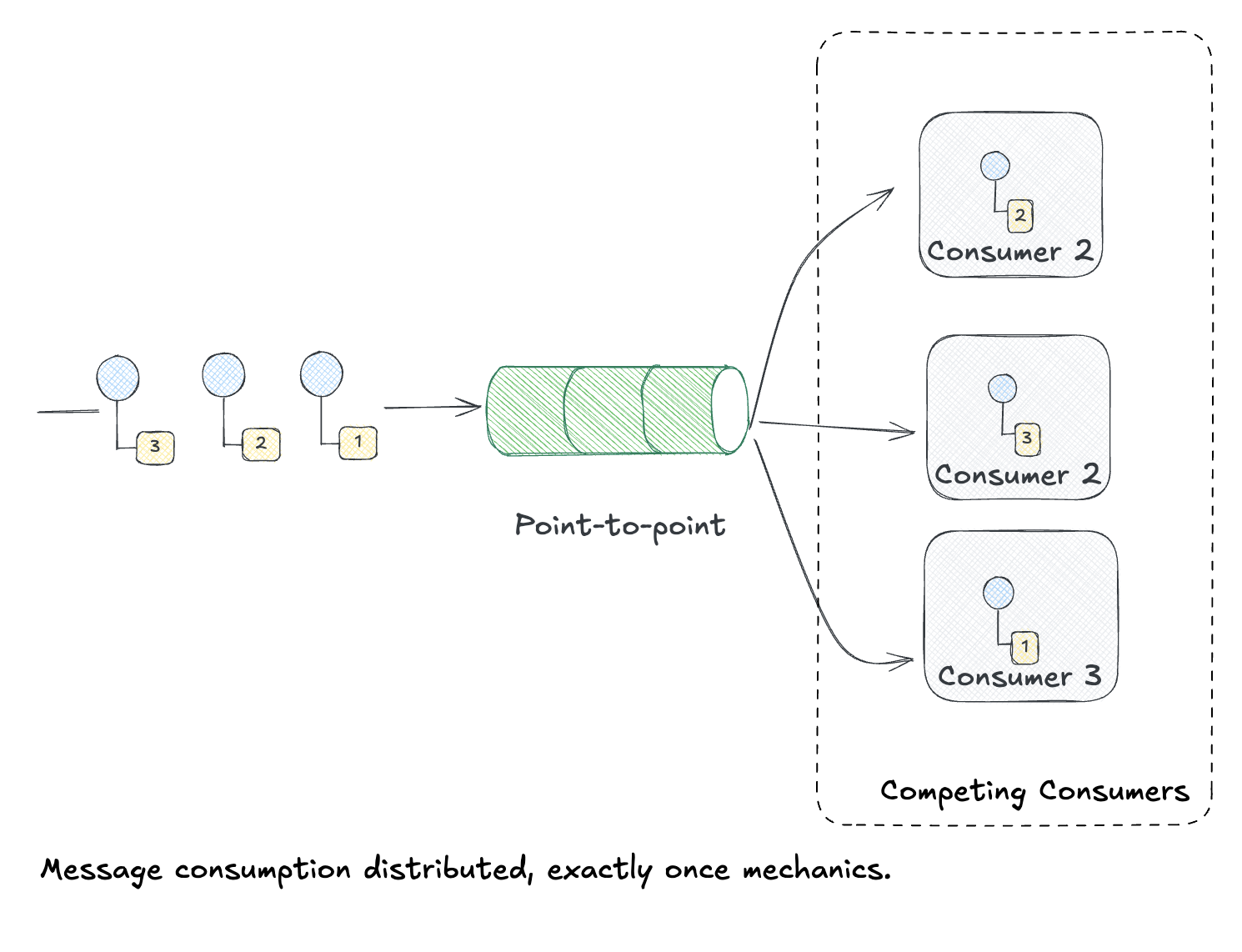
JetStream handles load balancing automatically. Scale up by running more instances of subscribers using the same consumer name.
Publish-Subscribe (Fan-out)
What if multiple services need the same event? Create separate durable consumers on the same stream. Each consumer maintains its own position and receives all messages independently.
I added an audit-logger service to demonstrate this:
// Both consumers subscribe to the same subject, but have different durable names
// Each receives ALL FileDeletedEvent messages independently

// Consumer 1: trash-processor (stores in DB, emits FilePlacedInTrashEvent)
await jsm.consumers.add("FILE_EVENTS", {
  durable_name: "trash-processor",
  filter_subject: "files.deleted",
});

// Consumer 2: audit-logger (writes to audit log)
await jsm.consumers.add("FILE_EVENTS", {
  durable_name: "audit-logger",
  filter_subject: "files.deleted",
});
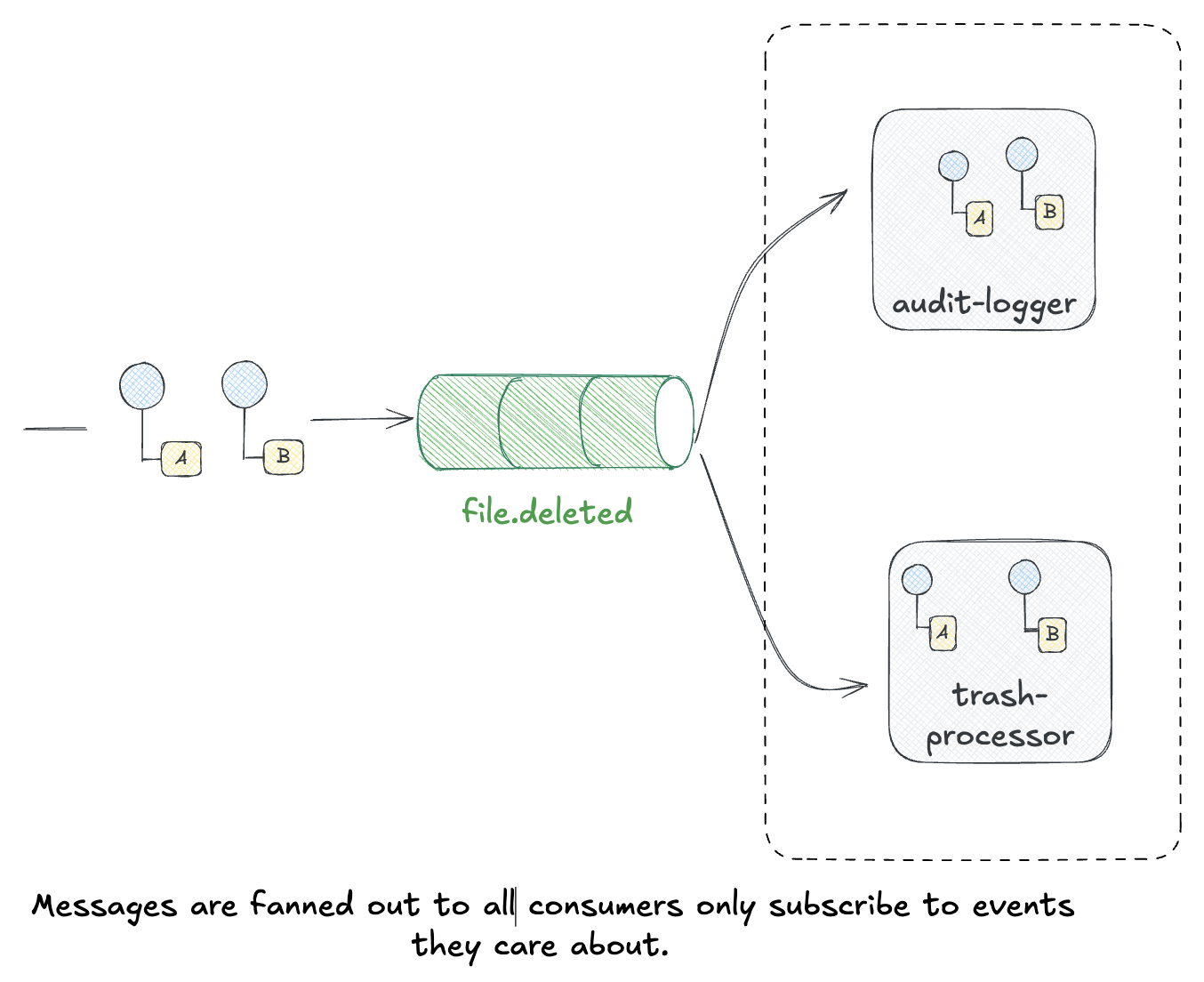
Both services process the same events independently. If the audit-logger falls behind or restarts, it catches up from its own position without affecting the trash-processor.
Message Filter (Subject Wildcards)
JetStream filters messages at the broker level using subject patterns. The filtering happens server-side—consumers only receive messages matching their filter.
Different consumers can filter for different subsets:
// Analytics: receives ALL file events
await jsm.consumers.add("FILE_EVENTS", {
  durable_name: "analytics-service",
  filter_subject: "files.>",  // Wildcard
});

// Cleanup service: only receives deletions
await jsm.consumers.add("FILE_EVENTS", {
  durable_name: "cleanup-service",
  filter_subject: "files.deleted",
});

// Notification service: only receives trash events
await jsm.consumers.add("FILE_EVENTS", {
  durable_name: "notification-service",
  filter_subject: "files.trashed",
});

Each consumer receives only what it asks for. The cleanup service never sees files.trashed events; the notification service never sees files.deleted. This is routing at the infrastructure level.
Content-Based Router
Message Filter routes by subject. Content-Based Router routes by message content—fields inside the payload.
When a consumer subscribes to multiple event types (like our analytics service with files.>), it needs to dispatch messages to different handlers:
for await (const msg of messages) {
  const event = decode(msg.data);

  // Route based on eventType field in the payload
  if (event.eventType === "FileDeletedEvent") {
    handleDeletion(event);
  } else if (event.eventType === "FilePlacedInTrashEvent") {
    handleTrashed(event);
  }

  msg.ack();
}
This is routing at the application level. The analytics service combines both patterns: Message Filter (wildcard subscription to receive everything) plus Content-Based Router (dispatching by eventType to different handlers).
Running All Examples
To see all patterns in action:
# Terminal 1: Competing consumer (processes deletions)
just dev-subscriber

# Terminal 2: Fan-out consumer (audit logging)
just dev-audit-logger

# Terminal 3: Message filter + content router (analytics)
just dev-analytics

# Terminal 4: Publisher (generates events)
just dev-publisher
The subscriber and audit-logger both receive FileDeletedEvent—that’s fan-out. The analytics service receives both FileDeletedEvent and FilePlacedInTrashEvent—that’s the wildcard filter. It then routes them to different handlers—that’s content-based routing.
Documenting with AsyncAPI
Following the pattern from my previous post on AsyncAPI, the project includes full event documentation with nats and jetstream as supported channels.
asyncapi: 3.0.0
info:
  title: File Trash Service
  version: 1.0.0
  description: |
    Event-driven file trash service that processes file deletion events
    and manages the trash lifecycle for users.

channels:
  filesDeleted:
    address: files.deleted
    messages:
      FileDeletedEvent:
        $ref: '#/components/messages/FileDeletedEvent'
    bindings:
      nats:
        jetstream:
          stream: FILE_EVENTS

  filesTrashed:
    address: files.trashed
    messages:
      FilePlacedInTrashEvent:
        $ref: '#/components/messages/FilePlacedInTrashEvent'
The nats bindings document which JetStream stream backs each channel. This makes the invisible infrastructure visible.
Here’s what it looks like in practice. First, the subscriber starts up and waits:
❯ just dev-subscriber

🚀 File Trash Subscriber starting...
📡 Connecting to NATS at nats://localhost:4222
🗄️  Connecting to PostgreSQL at localhost:5432
Connected to NATS at localhost:4222
Connected to PostgreSQL at localhost:5432/filetrash
Stream "FILE_EVENTS" already exists
Consumer "trash-processor" already exists on stream "FILE_EVENTS"
✅ Subscriber ready. Listening for FileDeletedEvent on "files.deleted"
Then the publisher starts emitting events:
❯ just dev-publisher

📤 Published FileDeletedEvent: 04d05b5f... (file: screenshot.png, user: a1b2c3d4...) [seq: 23]
📤 Published FileDeletedEvent: ede39982... (file: backup.zip, user: e5f6a7b8...) [seq: 25]
And the subscriber processes them:
📥 Received FileDeletedEvent: ede39982... (file: backup.zip, user: e5f6a7b8...)
💾 Stored in trashed_files table: bf8bc8a6...
📤 Published FilePlacedInTrashEvent: 9ad13462... [seq: 26]
✅ Message processed successfully
Try It Yourself
The complete project is available:
git clone https://github.com/jamescarr/jetstream-messaging
cd jetstream-messaging
just up-build
just logs
It includes:
- TypeScript publisher and subscriber
- PostgreSQL for the
trashed_filestable - AsyncAPI documentation
- Docker Compose for local development
justfilewith helpful commands
References
- Jepsen: NATS 2.12.1 Analysis - The analysis that sparked this exploration
- NATS JetStream Documentation - Official concepts guide
- JetStream Walkthrough - Hands-on tutorial
- Streams in JetStream - Deep dive on stream configuration
- Consumers in JetStream - Understanding consumer types
- JetStream Clustering - High availability setup
- NATS TypeScript Client - The nats package we used