Something that has been on my mind lately is the lack of visibility around messaging architectures. For example, if you’ve built REST APIs, you likely have OpenAPI specs that define your endpoints, schemas, and operations in YAML, and you get documentation, client generation, and contract testing for free. It’s become table stakes for HTTP APIs.
But what about event-driven systems? When services communicate through Kafka topics and SQS queues, how do you answer:
- What events exist in the system?
- Who produces them? Who consumes them?
- What’s the schema of each message?
- What happens if I need to change an event?
The problem is there seems to be no good way to define these integration touch points.
The Problem: Invisible Integration
In a typical event-driven architecture, integration points are invisible. REST endpoints show up in API gateways and are easily discoverable. But Kafka topics? They’re hidden in broker configurations, consumer group assignments, and tribal knowledge.
Our order fulfillment system looks like this:
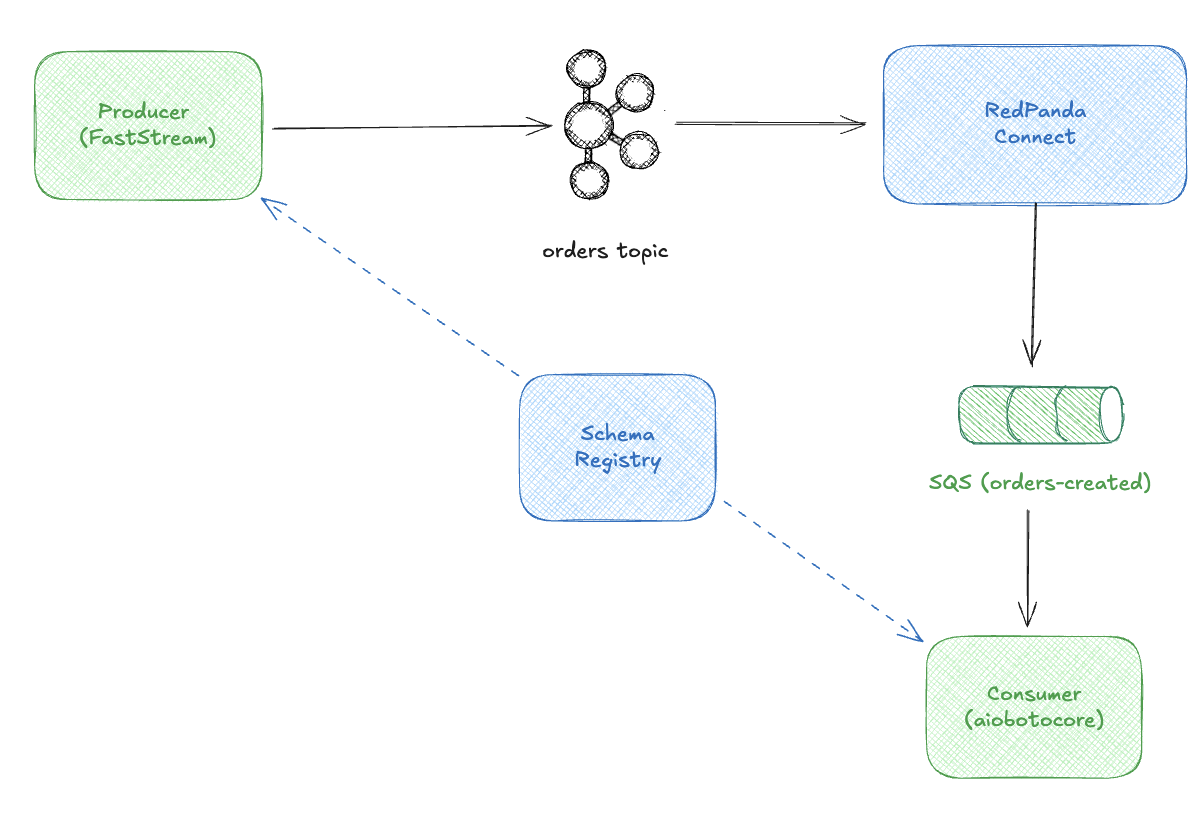
The producer publishes OrderCreated events to Kafka. An event bridge like Redpanda Connect bridges them to SQS. A consumer polls SQS and fulfills orders. Avro schemas in the Schema Registry define the contracts between systems but nothing about the messaging endpoints.
Without documentation, a new developer would need to:
- Read producer code to find what topics it publishes to
- Read consumer code to find what it subscribes to
- Inspect the Schema Registry to understand message formats
- Hope someone remembers how Redpanda Connect routes messages
I’m currently looking into how one documents these kind of relationships and AsyncAPI is one solution that popped up on my radar that I thought I would take some time out to look deeply into.
What is AsyncAPI?
AsyncAPI is a specification for describing event-driven APIs like OpenAPI with a YAML/JSON format that defines:
- Servers: Broker connection details (Kafka, RabbitMQ, SQS, etc.)
- Channels: Topics or queues where messages flow
- Operations: What your service does (publish or subscribe)
- Messages: The events themselves, including schemas
Here’s the basic structure:
asyncapi: 3.0.0
info:
  title: Order Service
  version: 1.0.0

servers:
  production:
    host: kafka.example.com:9092
    protocol: kafka

channels:
  orders.created:
    address: orders.created
    messages:
      OrderCreated:
        $ref: '#/components/messages/OrderCreated'

operations:
  publishOrder:
    action: send
    channel:
      $ref: '#/channels/orders.created'

components:
  messages:
    OrderCreated:
      payload:
        # schema goes here
Two Paths to AsyncAPI
There are two main approaches to creating AsyncAPI specs:
- Code-first: Define your events in code (Pydantic models), let a framework generate the spec
- Schema-first: Start with schemas (Avro, Protobuf), reference them from your AsyncAPI spec
I’ll walk through both, starting with the easier path.
The Easy Path: Pydantic Models + FastStream
If you’re starting fresh with Python, the easiest approach is code-first. Define Pydantic models, use FastStream, and let the framework generate your AsyncAPI spec automatically.
Here’s our order producer:
from datetime import datetime
from decimal import Decimal
from pydantic import BaseModel, Field
from faststream import FastStream
from faststream.kafka import KafkaBroker
from faststream.specification import AsyncAPI

# Define your event with Pydantic
class OrderItem(BaseModel):
    product_id: str
    product_name: str
    quantity: int = Field(gt=0)
    unit_price: Decimal

class OrderCreated(BaseModel):
    """Event published when a new order is created."""
    order_id: str
    customer_id: str
    customer_email: str
    items: list[OrderItem]
    total_amount: Decimal
    created_at: datetime

# Set up FastStream with AsyncAPI metadata
broker = KafkaBroker("localhost:19092")

spec = AsyncAPI(
    title="Order Producer Service",
    version="1.0.0",
    description="Generates order events and publishes them to Kafka.",
)

app = FastStream(broker, specification=spec)

# Type the publisher with your Pydantic model
publisher = broker.publisher(
    "orders.created",
    title="OrderCreated",
    description="Publishes new order events",
    schema=OrderCreated,  # This drives schema generation
)
Now generate the AsyncAPI spec:
$ faststream docs gen app.main:app --yaml
FastStream inspects your Pydantic models and generates a complete spec:
asyncapi: 3.0.0
info:
  title: Order Producer Service
  version: 1.0.0
  description: Generates order events and publishes them to Kafka.
channels:
  OrderCreated:
    address: orders.created
    messages:
      Message:
        $ref: '#/components/messages/OrderCreated:Message'
components:
    messages:
    OrderCreated:Message:
      payload:
        $ref: '#/components/schemas/OrderCreated'
  schemas:
    OrderCreated:
      description: Event published when a new order is created.
      properties:
        order_id:
          type: string
        customer_id:
          type: string
        customer_email:
          type: string
        items:
          type: array
          items:
            $ref: '#/components/schemas/OrderItem'
        total_amount:
          type: number
        created_at:
          type: string
          format: date-time
      required: [order_id, customer_id, customer_email, items, total_amount, created_at]
    OrderItem:
      # ... generated from Pydantic model
That’s it. The Pydantic models become JSON Schema in the AsyncAPI spec. Change the model, regenerate the spec, documentation stays in sync.
You can even serve interactive docs:
$ faststream docs serve app.main:app
# Opens browser with AsyncAPI Studio
But What About Existing Schemas?
The Pydantic approach is great for greenfield projects. But here’s the thing—I’m not starting fresh. The systems I work with already have message schemas defined, and they’re not in Python.
They’re in Avro.
A Quick Primer on Avro
If you haven’t encountered Apache Avro, it’s a data serialization system that’s become popular in event-driven architectures, especially in the Kafka ecosystem. You define schemas in JSON:
{
  "type": "record",
  "name": "OrderCreated",
  "namespace": "com.example.orders",
  "fields": [
    {"name": "order_id", "type": "string"},
    {"name": "customer_id", "type": "string"},
    {"name": "total_amount", "type": {"type": "bytes", "logicalType": "decimal", "precision": 10, "scale": 2}}
  ]
}
Why do organizations use it?
- Language-agnostic: The same schema works for Java, Python, Go—whatever language each team prefers
- Schema evolution: A Schema Registry enforces compatibility rules (backward, forward, full compatibility)
- Centralized governance: One place to see and manage all event contracts across the organization
- Binary efficiency: Avro serializes to compact binary format—smaller and faster than JSON over the wire
The tradeoff is infrastructure (you need a Schema Registry) and a learning curve (Avro syntax isn’t as intuitive as Pydantic). But for organizations with polyglot services and strict contract requirements, it’s worth it.
Why I’m Exploring Avro + AsyncAPI
My current workplace already has Avro schemas defined as the source of truth for events. Rather than duplicate them in Pydantic models (and risk drift), I want AsyncAPI to reference what already exists. Can it work? Let’s find out.
Referencing Avro Schemas from AsyncAPI
Good news: AsyncAPI supports referencing external schemas, including from a Schema Registry. Here’s what we’re working with—Avro schemas already registered:
$ curl -s http://localhost:18081/subjects | jq .
[
  "orders.created-value",
  "orders.accepted-value",
  "orders.shipped-value"
]
Here’s what OrderCreated looks like in Avro:
{
  "type": "record",
  "name": "OrderCreated",
  "namespace": "com.example.orders.events",
  "doc": "Event emitted when a new order is created",
  "fields": [
    {"name": "order_id", "type": "string"},
    {"name": "customer_id", "type": "string"},
    {"name": "customer_email", "type": "string"},
    {"name": "items", "type": {"type": "array", "items": {...}}},
    {"name": "total_amount", "type": {"type": "bytes", "logicalType": "decimal"}},
    {"name": "created_at", "type": {"type": "long", "logicalType": "timestamp-millis"}}
  ]
}
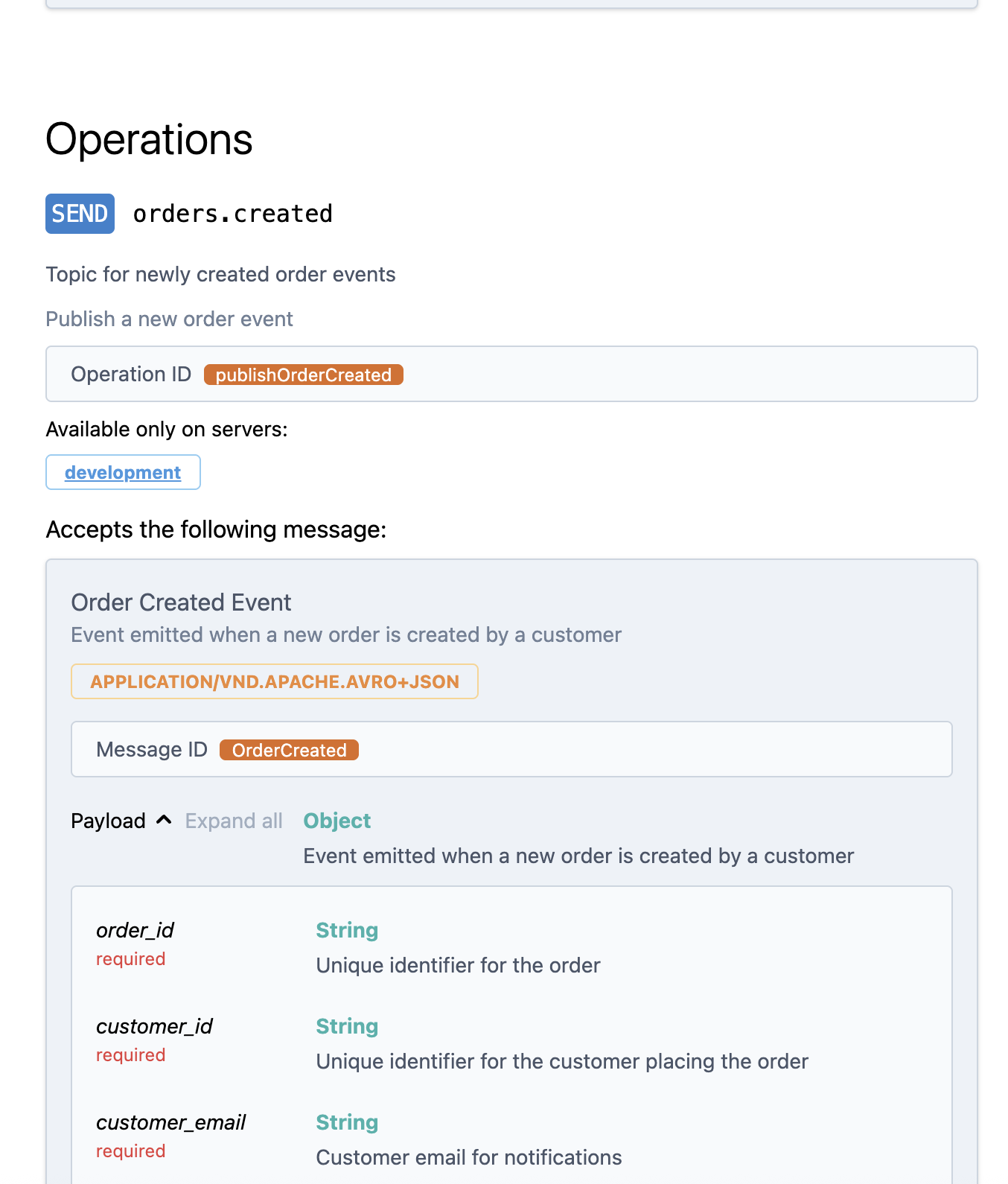
Now, can AsyncAPI reference these directly? Yes! The spec supports external $ref URLs pointing to a Schema Registry:
asyncapi: 3.0.0
info:
  title: Order Producer Service
  version: 1.0.0

servers:
  development:
    host: localhost:19092
    protocol: kafka

channels:
  orders.created:
    address: orders.created
    messages:
      OrderCreated:
        $ref: '#/components/messages/OrderCreated'

operations:
  publishOrderCreated:
    action: send
    channel:
      $ref: '#/channels/orders.created'

components:
  messages:
    OrderCreated:
      contentType: application/vnd.apache.avro+json
      payload:
        schemaFormat: 'application/vnd.apache.avro+json;version=1.9.0'
        schema:
          $ref: 'http://localhost:18081/subjects/orders.created-value/versions/latest/schema'
The $ref points directly to our Schema Registry. Benefits:
- Single source of truth: Avro schemas define contracts, AsyncAPI documents them
- Always in sync: References the latest registered schema version
- Bundling support:
asyncapi bundleresolves the URL and inlines the schema
Documenting Our Consumer
The consumer is different—it reads from SQS, not Kafka directly. Redpanda Connect bridges the gap. The AsyncAPI spec reflects this:
asyncapi: 3.0.0
info:
  title: Order Fulfillment Service
  version: 1.0.0
  description: |
    Consumes order events from SQS.

    ## Events Consumed
    - **OrderCreated**: Triggers the fulfillment process

servers:
  development:
    host: localhost:4566
    protocol: sqs
    description: LocalStack SQS (local development)
  production:
    host: sqs.us-east-1.amazonaws.com
    protocol: sqs
    description: AWS SQS (production)

channels:
  order-events:
    address: https://sqs.us-east-1.amazonaws.com/123456789012/order-events
    description: Queue for incoming order events
    messages:
      OrderCreated:
        $ref: '#/components/messages/OrderCreated'

operations:
  receiveOrderCreated:
    action: receive
    channel:
      $ref: '#/channels/order-events'
    summary: Receive and fulfill orders

components:
  messages:
    OrderCreated:
      name: OrderCreated
      contentType: application/json
      payload:
        $ref: '#/components/schemas/OrderCreated'

  schemas:
    OrderCreated:
      type: object
      description: Order event (JSON, converted from Avro by the bridge)
      required: [order_id, customer_id, items, total_amount]
      properties:
        order_id:
          type: string
        customer_id:
          type: string
        # ... JSON Schema matching the Avro structure
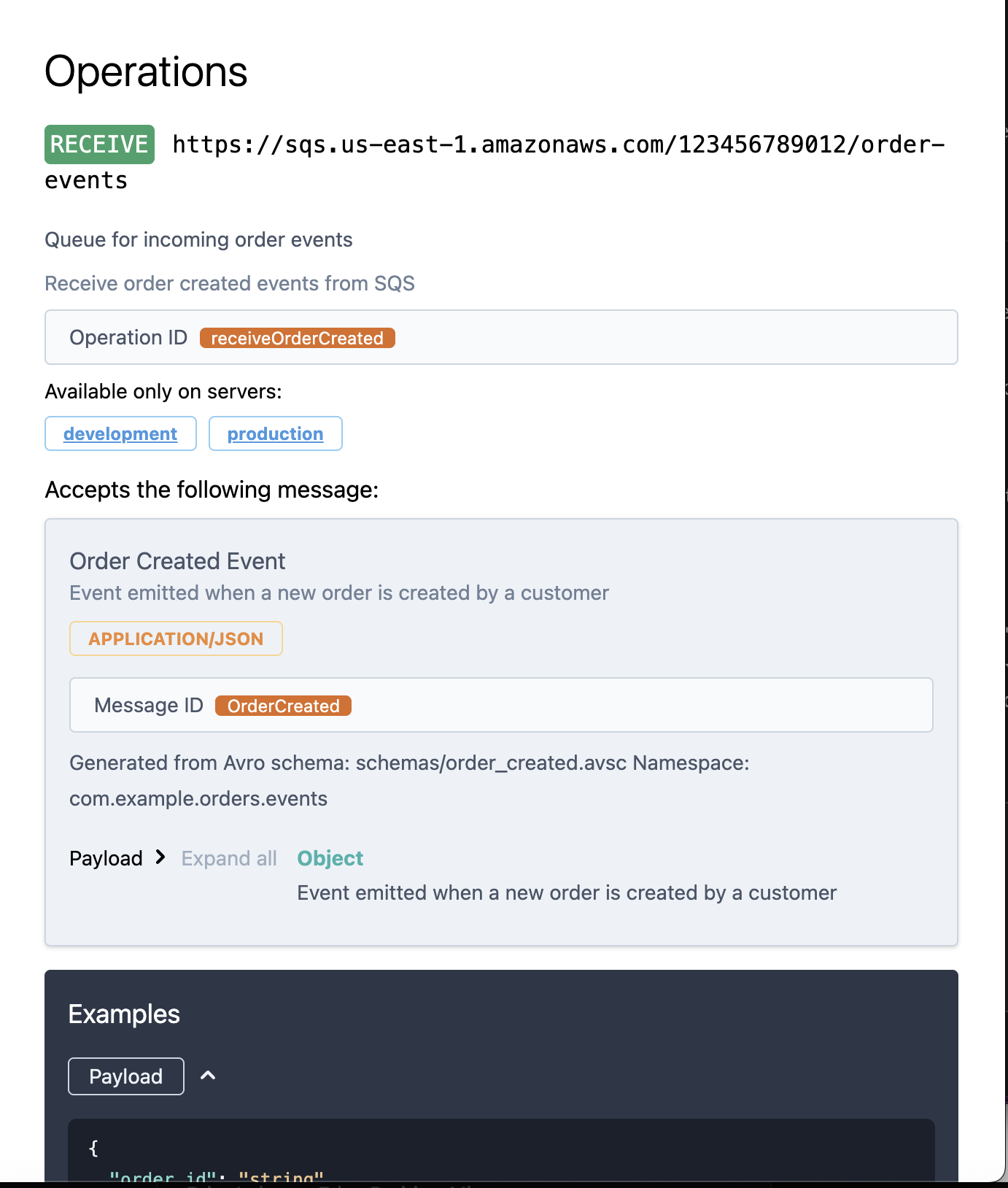
Key differences from the producer:
- Protocol is
sqs, notkafka - Content type is
application/json(Redpanda Connect converts Avro to JSON) - Schema is JSON Schema, not an Avro reference
This accurately reflects what the consumer actually sees.
Using the AsyncAPI CLI
The AsyncAPI CLI provides powerful tooling:
# Install
npm install -g @asyncapi/cli

# Validate your specs
asyncapi validate docs/asyncapi-producer.yaml

# Bundle (resolves all $ref, including Schema Registry URLs!)
asyncapi bundle docs/asyncapi-producer.yaml -o docs/bundled/producer.yaml

# Start interactive documentation
asyncapi start studio docs/asyncapi-producer.yaml

# Generate HTML documentation
asyncapi generate fromTemplate docs/asyncapi-producer.yaml @asyncapi/html-template -o docs/html
The bundle command is particularly useful—it fetches schemas from the registry and creates a self-contained spec:
$ asyncapi bundle docs/asyncapi-producer.yaml
# Output includes full Avro schema inlined from Schema Registry
Which Approach Should You Use?
Here’s a quick decision guide:
| Code-First (Pydantic) | Schema-First (Avro) | |
|---|---|---|
| Best for | New projects, single language | Existing schemas, polyglot teams |
| Maintenance | Zero—spec generated from code | Moderate—spec references external schemas |
| Language support | Python (FastStream) | Any language |
| Schema evolution | Manual | Registry-enforced compatibility |
| Protocol support | Kafka, RabbitMQ | Any (you write the spec) |
My recommendation: Start with code-first if you can. It’s simpler. But if your organization already has Avro schemas as contracts—as mine does—schema-first keeps everything in sync without duplicating definitions.
Making a Change: The Full Path
Let’s walk through adding a new field to see how everything stays in sync.
Scenario: We need to add a priority field to orders.
Step 1: Update the Avro Schema
# schemas/order_created.avsc
{
  "type": "record",
  "name": "OrderCreated",
  "fields": [
    {"name": "order_id", "type": "string"},
    {"name": "customer_id", "type": "string"},
+   {"name": "priority", "type": "string", "default": "normal", "doc": "Order priority: normal, high, rush"}
  ]
}
Note the default value—this ensures backward compatibility. Existing consumers won’t break.
Step 2: Register the Updated Schema
$ just register-all-schemas

# Schema Registry validates compatibility
# If incompatible, registration fails (safety net!)
Step 3: Update the Pydantic Model (Producer)
class OrderCreated(BaseModel):
    order_id: str
    customer_id: str
    priority: str = "normal"  # Match the Avro default
Step 4: Regenerate the AsyncAPI Spec
$ just generate-specs
$ just bundle

# The bundled spec now includes the new field:
# docs/bundled/asyncapi-producer.yaml
schema:
  type: record
  name: OrderCreated
  fields:
    - name: order_id
      type: string
    - name: customer_id
      type: string
    - name: priority
      type: string
      default: normal
      doc: "Order priority: normal, high, rush"
Step 5: Validate
$ just validate
✓ All specs valid
The change flows through:
Avro Schema → Schema Registry → AsyncAPI Spec → Documentation
     ↓
Pydantic Model → Producer Code
Both paths stay in sync because they reference the same source of truth.
With AsyncAPI specs in place, it feels like it makes it easier to connect where events flow in and out of various areas of the system. There are now all kinds of benefits we can leverage.
Discover events: New developer? Read the specs to understand the event landscape.
Validate contracts: CI/CD can validate specs haven’t broken.
# GitHub Actions
- name: Validate AsyncAPI
  run: asyncapi validate docs/asyncapi-producer.yaml
Generate documentation: Beautiful, interactive docs like Swagger UI.
Generate code: TypeScript types, Python models from your specs.
asyncapi generate models python docs/asyncapi-producer.yaml -o ./models
Track ownership: Each spec declares who owns what events.
Honest Critique
AsyncAPI fills a real gap, but it’s not as turnkey as OpenAPI has become for REST APIs.
In Python, FastStream does solid work for Kafka and RabbitMQ—but step outside those protocols and you’re on your own. There isn’t yet a universal library that plugs into whatever messaging framework your team already uses and just generates specs. Compare that to Django REST Framework or FastAPI, where OpenAPI generation is essentially free.
Part of this is inherent complexity. Messaging topologies vary wildly—Kafka with Avro and Schema Registry looks nothing like NATS+Jetstream with JSON objects. The permutations make it hard for any single tool to cover everything elegantly.
The ideal would be code-level decorators that work across frameworks: mark your consumers, mark your producers, define your messages, and let the tooling figure out the spec. We’re not quite there yet, but the ecosystem is moving in that direction.
What’s Next
This post covers the basics. AsyncAPI enables much more:
- Event catalogs: Tools like EventCatalog aggregate specs for organization-wide discovery
- Contract testing: Verify implementations match specs
- Schema evolution tracking: Combined with Schema Registry, track changes over time
- Governance: Approval workflows for breaking changes
There’s so much to dig into and understand deeply. My key interest at the moment is how to properly implement a kind of Event Catalog. How do we know which systems consume a specific event? Specifically, who consumes and processes a CustomerDataDeletionRequest Event?
Next up I want to explore how AsyncAPI fits into an Internal Developer Platform like Backstage—aggregating specs across services, visualizing event flows, and making the invisible visible at scale.
Try It Yourself
The complete demo is on GitHub: jamescarr/asyncapi-demo
git clone https://github.com/jamescarr/asyncapi-demo
cd asyncapi-demo

# Start the stack (Redpanda, LocalStack, services)
just up

# Register Avro schemas
just register-all-schemas

# Generate and validate specs
just generate-specs
just validate

# Open in AsyncAPI Studio
just studio-producer
just studio-consumer

# View logs
just logs
The repo includes:
- FastStream producer publishing to Kafka
- Redpanda Connect bridging to SQS
- aiobotocore consumer polling SQS
- Avro schemas in Schema Registry
- AsyncAPI specs for both services
justfilewith all commands